

1
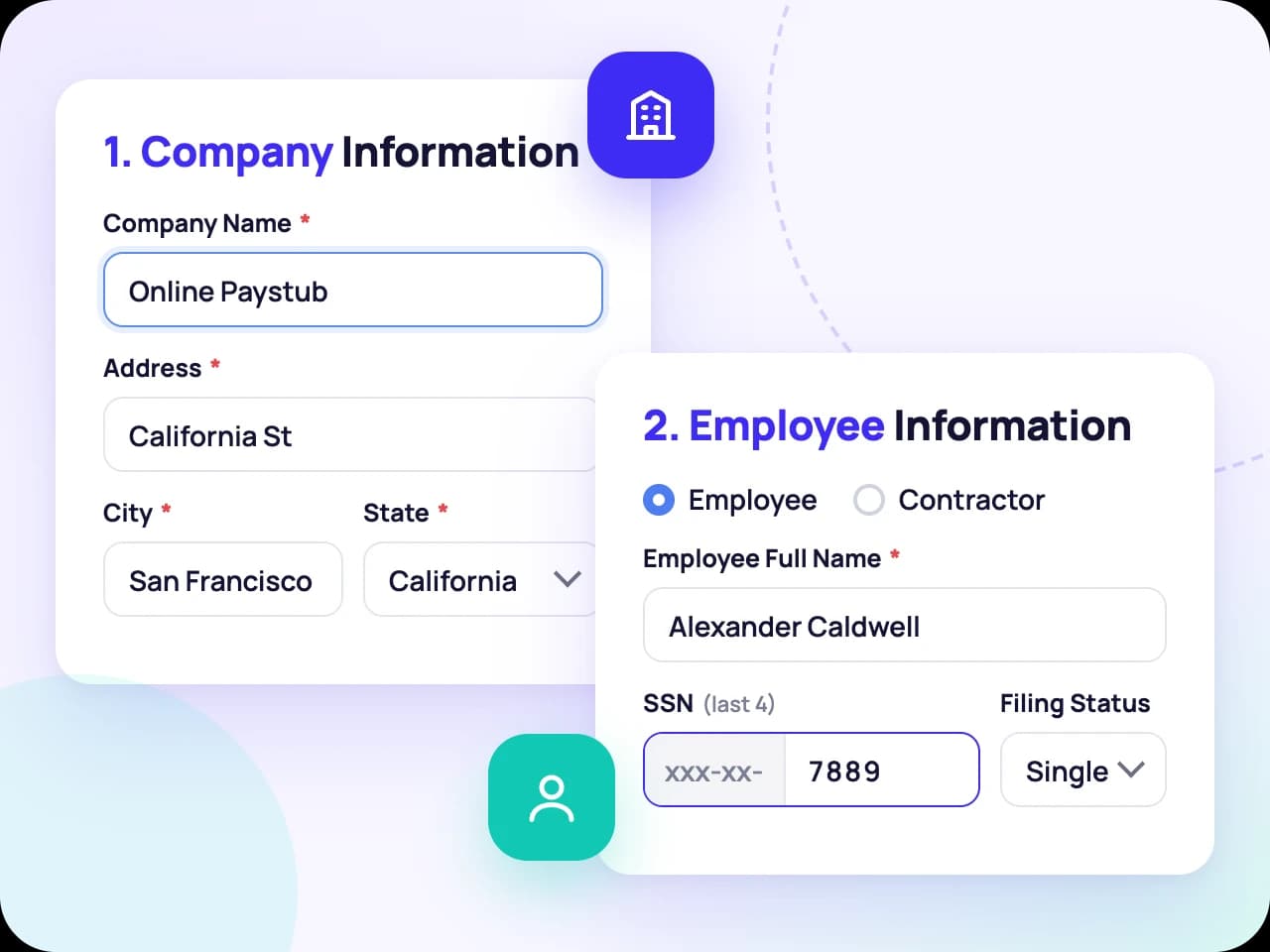
Step 1: Enter Company and Employee Details
Add the company name and address, then the employee's name, the last four digits of their SSN and federal filing status. Contractors work the same way, with no taxes withheld.
Start creating your pay stub right here with Online Paystub; either with the help of AI or by filling out the form.
Hi! I will fill in your paystub through a short conversation. Three quick questions, then the preview opens.
What is the company's legal name?
Money-back guarantee · Free preview · No subscription · Reviews on Trustpilot
Recent feedback from people who created a pay stub with Online Paystub.
Very easy to use and much faster than I expected. The live preview made it simple to double check everything before finishing the document. The final pay stub looked clean and professional.
This was my first time using an online pay stub generator and the experience was surprisingly smooth. I especially liked the preview feature because it helped me notice a small error before completing the document.
Really happy with how simple the process was. I entered the details, reviewed everything and had the document ready without wasting much time. I would definitely use the service again.
Overall, a really convenient service. Entering the information was simple and I liked being able to see the document while I was working on it. Saved me a lot of time compared with doing it manually.
A useful tool when you need to create a pay stub quickly. The process did not feel complicated and everything I needed was easy to find. The final document came out looking clean and organized.
I needed a pay stub on short notice and the whole process was pretty straightforward. The instructions were clear and I was able to complete everything without having to figure out complicated payroll software.
The website was simple to navigate and I had my pay stub ready within a few minutes. Everything was clearly organized and the finished PDF looked very professional.
A pay stub is a document that shows how a worker’s pay was calculated for a specific pay period. It lists total earnings, every tax and deduction taken out and the final amount the worker takes home. If you want a deeper explanation, see our guide on what a paystub is and how it works.
The paycheck is the payment itself, whether it arrives as a physical check or a direct deposit. The pay stub is the record that explains that payment: gross pay, withholdings, deductions and net pay. Many employees who are paid by direct deposit only ever see the pay stub, which is why it is the document landlords, lenders and tax preparers usually ask for.
Depending on the employer or industry, a pay stub may be called a paycheck stub, check stub, payroll stub, earnings statement, wage statement or payslip. They all refer to the same thing: an itemized breakdown of one pay period.
For employees, pay stubs make it possible to confirm they were paid correctly, track taxes withheld throughout the year and prove income when needed. For employers, issuing clear pay stubs supports accurate payroll records, reduces pay disputes and helps meet state wage statement rules.

You enter the details, Online Paystub handles the calculations and you download a finished PDF. For a closer look at each field, read our step-by-step guide to making a paystub.
Add the company name and address, then the employee's name, the last four digits of their SSN and federal filing status. Contractors work the same way, with no taxes withheld.
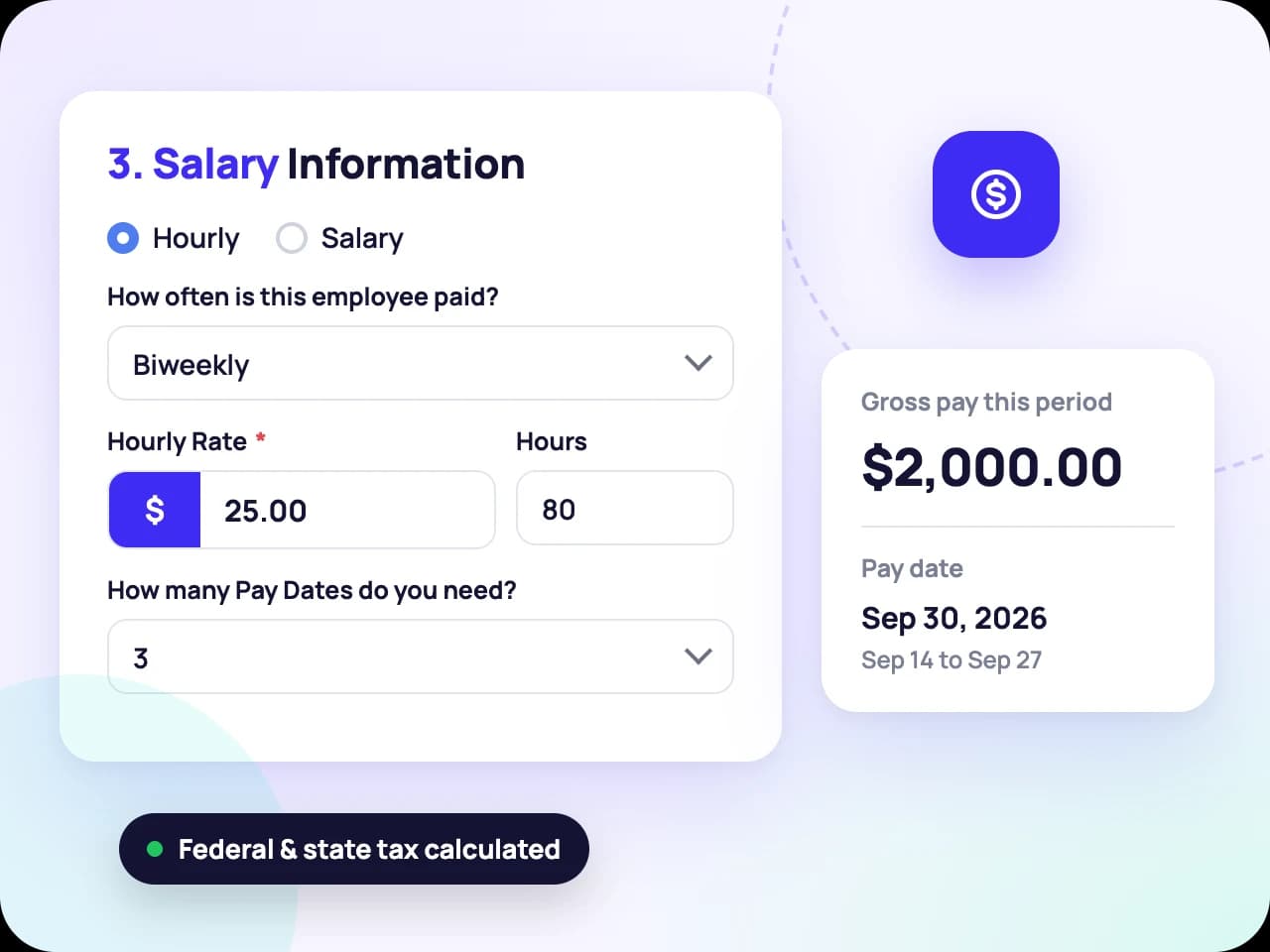
Choose hourly or salary, set the pay frequency and enter the rate, hours and pay dates. Gross pay, federal and state taxes, FICA and YTD totals are calculated as you type.
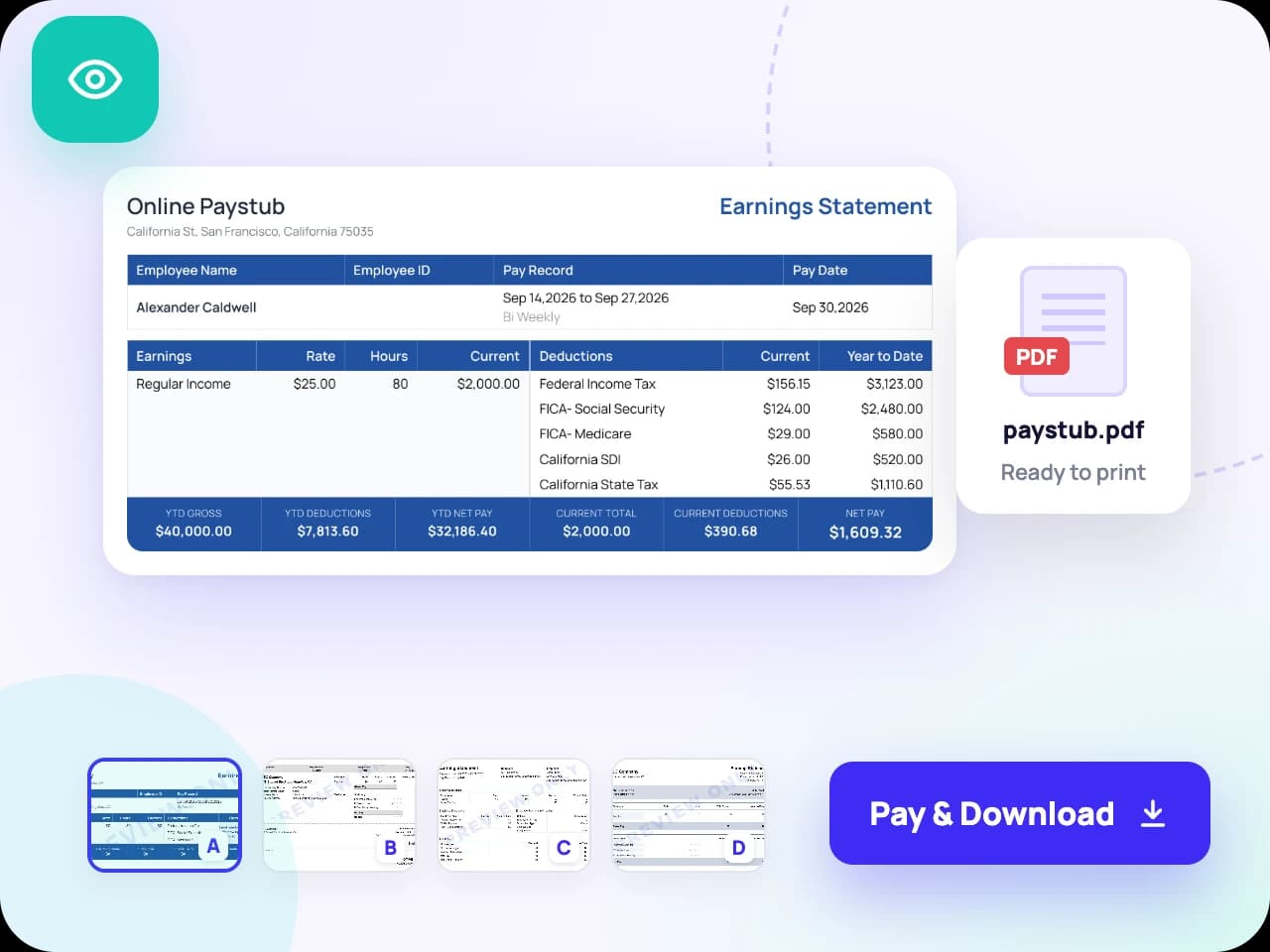
Pick a template, review the full preview for free and fix anything that looks off. When every line is right, pay $6.99 per stub and download your print-ready PDF instantly.
Switch to Create with AI and answer questions the way you would tell a bookkeeper: who the company is, who the employee is, how much they earn. The preview fills in after every answer and you can jump back to the form at any time.
Hi! I will fill in your paystub through a short conversation. The preview updates after each answer.
What is the company's legal name?
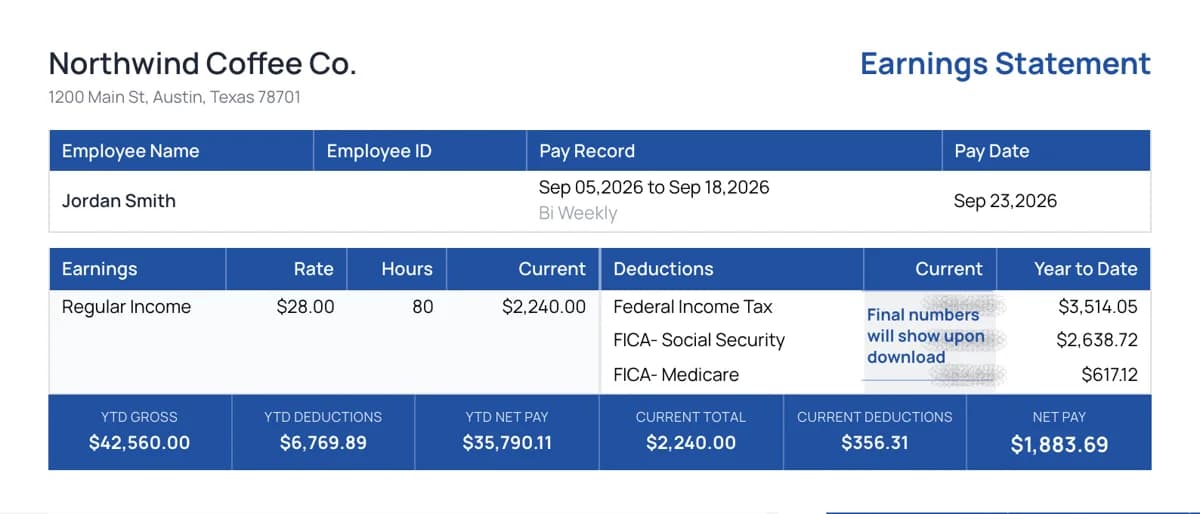
Northwind Coffee Co.
What is the company's street address, city and ZIP code?
1200 Main St, Austin, TX 78701
Who is the employee and how are they paid?
Jordan Smith, hourly, $28, 80 hours biweekly
A clean, consistent layout makes your pay stub easier to read and easier to review. Online Paystub includes 10 professional templates and you can switch between them at any time during the preview.
Choose Template
Pick a classic, modern or compact design depending on how you want your documents to look. Every template shows the same core information: earnings, taxes, deductions, net pay and YTD totals.
Upload your logo to give every stub a consistent, branded look. This is especially useful for small businesses issuing pay stubs to several employees each pay period.
If you pay by direct deposit, you can add a direct deposit slip to your pay stub so the payment details and the earnings breakdown stay together in one document.
Everything you need for one clear price of $6.99. No subscriptions, complicated plans, or surprise fees.
Review your completed pay stub and make edits before checkout.
Get a polished, print-ready PDF as soon as payment is complete.
Pay only for the documents you create. No plans or hidden fees.
Enter your information, review the details and download your finished PDF in just a few simple steps.
Choose your state to see its 2026 withholding, paid leave premiums, minimum wage and pay stub requirements, then create a stub that matches.
State income tax on wages No state income tax on wages
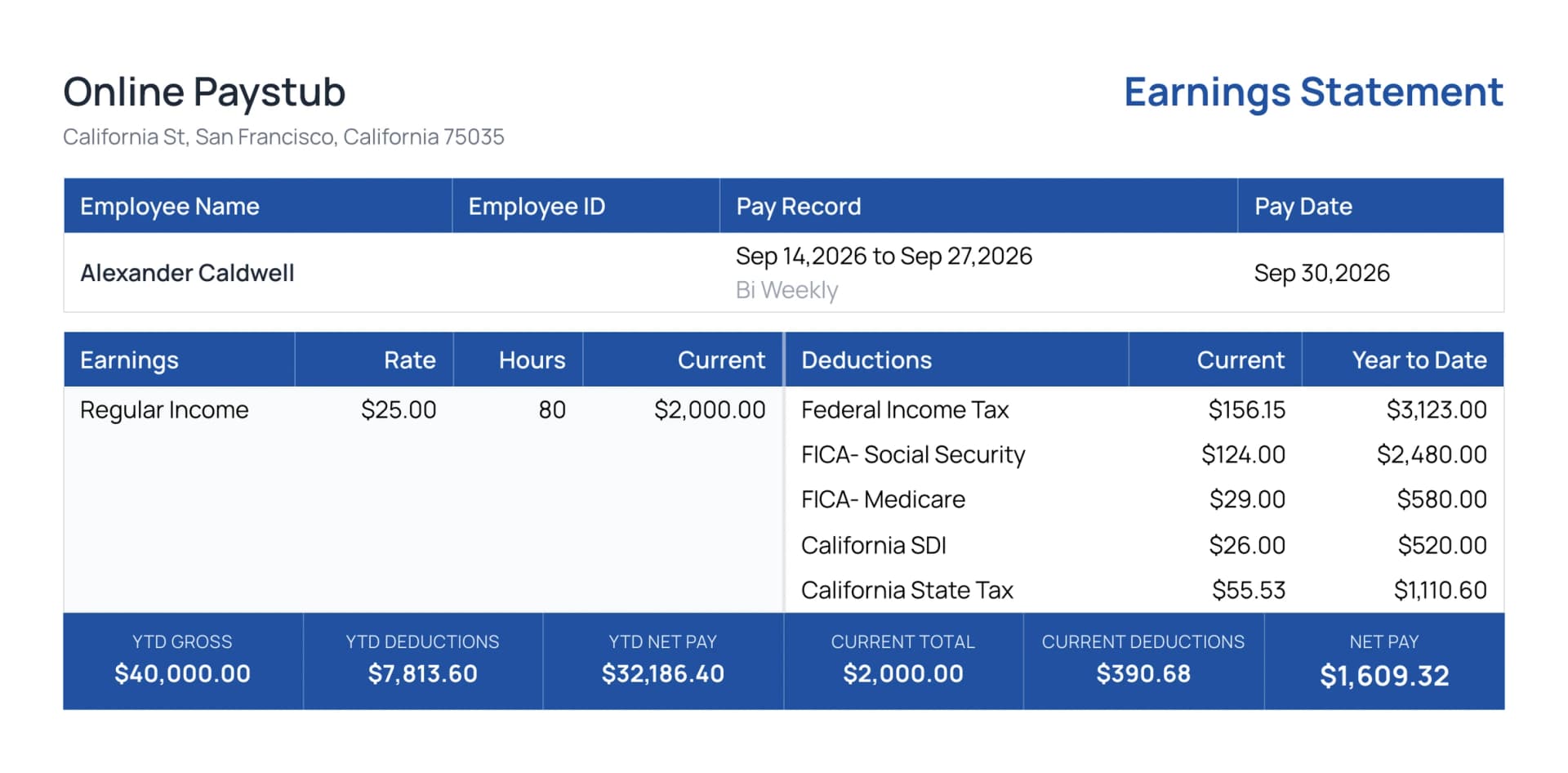
Most pay stubs follow the same basic layout, no matter which template or payroll system produced them. The top identifies the employer and the worker, the middle breaks down earnings, taxes and deductions and the bottom shows net pay with year-to-date totals beside each figure. Once you know that structure, any stub becomes easy to read.
The design is what changes. A stub from a large payroll provider may run two columns with dozens of deduction codes, while a small business stub might fit on a single compact block. The information underneath is the same and each section answers one question: who was paid, for which period, how much was earned, what was withheld and what was left over. If you want to see every field labeled on a real document, our annotated pay stub example walks through a full stub from top to bottom.
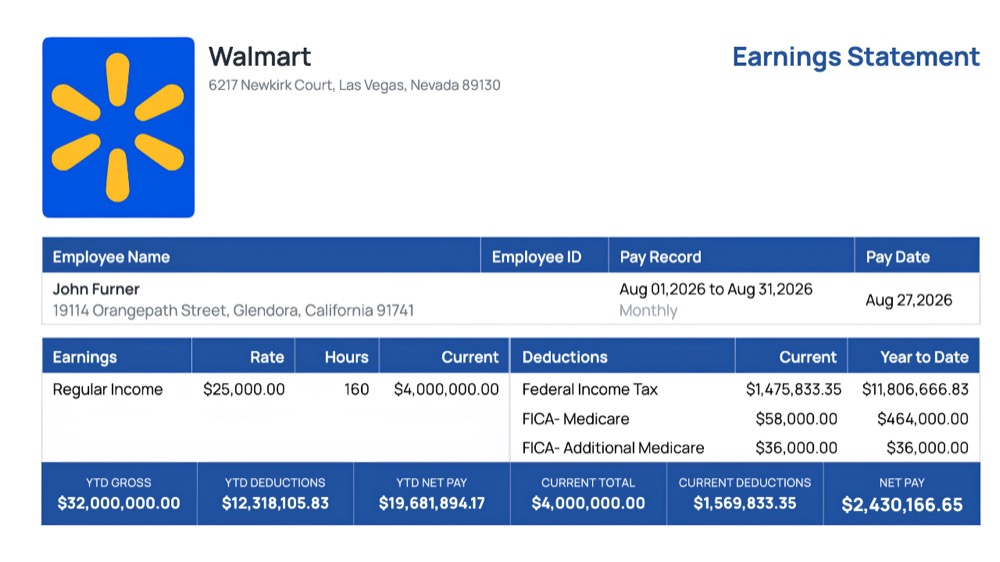
The top of the stub identifies who paid and who was paid. This usually includes the company name, address and EIN, along with the employee’s name, address and the last four digits of their Social Security number or an employee ID.
This section shows the start and end dates of the pay period, the date the payment was issued and how often the worker is paid: weekly, biweekly, semimonthly or monthly. Pay frequency affects how federal and state withholding is calculated.
The earnings section lists each type of pay separately. Hourly workers see regular hours, overtime hours and their rates. Salaried workers see their salary amount for the period. Bonuses, commissions, tips and holiday pay appear as additional lines and together they make up gross pay.
Here you will find federal income tax, state income tax where it applies and any local taxes. FICA taxes are listed as two lines: Social Security (6.2% up to the annual wage base) and Medicare (1.45%, plus an Additional Medicare Tax of 0.9% on wages above $200,000 for the year).
Deductions reduce the amount the worker takes home. Pre-tax deductions, such as 401(k) contributions, HSA or FSA contributions and some health insurance premiums, lower taxable income. Post-tax deductions include items like Roth contributions, child support and wage garnishments.
Net pay is the final take-home amount after all taxes and deductions. Next to each current-period figure, most pay stubs show a year-to-date total, which is the running sum from January 1 through the current pay date. YTD figures are what lenders and tax preparers look at first.
Pay stubs use short codes to save space. Some of the most common are FED TAX or FIT (federal income tax), ST TAX or SIT (state income tax), FICA or OASDI (Social Security), MED (Medicare), YTD (year-to-date), OT (overtime) and NET (net pay). The full list is in our guide to pay stub abbreviations.
Having the right information ready makes the process faster and helps avoid mistakes. Here is what to gather before you start.
You will need the business name, business address and Employer Identification Number (EIN). Self-employed individuals without an EIN can use their own business details.
Have the worker’s full name, address, the last four digits of their SSN and their worker type (W-2 employee or 1099 contractor). For employees, you will also need their federal filing status and any adjustments from their Form W-4, plus state withholding information where applicable.
Know whether the worker is paid hourly or by salary, their pay rate, hours worked (including overtime), pay frequency and the pay dates you need stubs for.
If the worker was paid earlier in the year through another system, have their prior year-to-date earnings and taxes ready so the new stubs continue the totals correctly. List any recurring deductions such as retirement contributions or insurance premiums.
Pay stubs are one of the most common documents used to show proof of income, because they show current earnings, pay frequency and year-to-date totals in one place. Whether a specific pay stub is accepted always depends on the organization reviewing it and many will also verify income through other sources.
Landlords and property managers usually ask for two or three recent pay stubs as proof of income, so they can confirm that an applicant earns enough to cover the rent each month.
Lenders usually request recent pay stubs along with W-2 forms or tax returns to confirm steady income before approving a mortgage or personal loan.
Auto lenders and dealerships commonly ask for recent pay stubs to confirm income and employment before approving financing or a lease.
Some government agencies and benefit programs request pay stubs to verify earnings as part of an application or review.
Pay stubs help you check that your W-2 is accurate, estimate taxes owed and keep a clear record of your income throughout the year.
Not every paystub maker is built the same. Some bury you in confusing fields, others charge before you can see the result. Online Paystub is designed to be accurate, transparent and simple from the first field to the final PDF.
Federal withholding follows IRS Publication 15-T and the current Form W-4 method. State income tax rules are built in for all 50 states, including the states with no income tax and tax tables are updated for each new tax year.
You can build your entire pay stub and review the full preview without paying anything. You only pay when you are ready to download the final PDF.
Change a name, fix a date, adjust hours or switch templates as many times as you like before you complete your order. Every change recalculates taxes, deductions and net pay instantly.
Each pay stub costs $6.99. There are no plans, no recurring charges and no hidden fees.
As soon as your order is complete, your print-ready PDF is ready to download, save, print or share.
Your information is transmitted over an encrypted connection and payments are processed through a secure checkout. We only use your details to generate your documents.
If your paystub cannot be delivered or our generator fails to produce the document you ordered, you are covered by our money-back guarantee. Contact our support team with your order details and we will review your request under the terms set out in our refund policy.
We want every document to be right the first time. That is why you can preview your pay stub in full, edit any field and switch templates before you pay. If something still is not right after checkout, reach out to our support team and we will work with you until your paystub is correct.
Every page is served over an encrypted SSL connection and payments are handled by a PCI-compliant payment processor, so your card details never touch our servers. We use the information you enter only to generate your documents.
Online Paystub supports both W-2 employees and 1099 contractors and the calculations change depending on which one you choose.
For W-2 employees, federal income tax, state tax, Social Security and Medicare are withheld from each paycheck. For 1099 contractors, no taxes are withheld by the payer, so a contractor pay stub typically shows gross payments and any agreed deductions, with net pay equal to the amount actually paid.
Contractors are responsible for paying their own taxes, including self-employment tax of 15.3% (Social Security and Medicare combined) on net earnings, usually through quarterly estimated payments. Keeping accurate pay stubs makes it easier to calculate these payments. Our guide to pay stubs for independent contractors walks through a full 1099 example.
There is no single national rule for pay stubs. Each state decides whether employers must provide them and whether electronic copies are enough. Browse our state-by-state paystub requirements to see the rules and tax details for your state.
A handful of states do not require employers to give employees pay stubs at all. Employers in these states still need to keep accurate payroll records under federal law.
In access states, employers must give employees access to their pay information. Electronic pay stubs are generally acceptable as long as employees can view them.
These states allow electronic pay stubs, but employees must be able to print them or receive a paper copy on request. California, for example, requires employers to provide itemized wage statements with specific information on each one.
In opt-out states, employers can switch to electronic pay stubs, but employees can choose to keep receiving paper copies.
Hawaii requires employee consent before an employer can provide pay stubs electronically. Without consent, employers must provide paper statements.
Each state has its own income tax rules and some have no state income tax at all. Use our state pages to create pay stubs with the correct state calculations:
Whether an employer must provide pay stubs depends on where the business operates. Federal law and state law treat the question differently.
No federal law requires employers to give employees pay stubs. However, the Fair Labor Standards Act (FLSA) requires employers to keep accurate records of each employee’s hours worked, wages paid and deductions. Issuing pay stubs is the simplest way to maintain those records and share them with employees.
Most states allow electronic pay stubs, but some require a printable version or a paper copy on request and Hawaii requires employee consent first. Check your state’s rules before switching to fully digital pay stubs.
A pay stub is only legitimate when it reflects real employment, real earnings and real payments. Online Paystub is built for lawful payroll and recordkeeping and every user agrees to our acceptable use terms.
Employers creating stubs for their employees, contractors documenting client payments and self-employed individuals recording their own income are all legitimate uses. In every case, the information entered must be accurate and truthful.
Fake pay stubs often contain math that does not add up, such as taxes that do not match gross pay, YTD totals that do not match the number of pay periods or a Social Security amount that is not 6.2% of wages. Other warning signs include missing employer details, inconsistent fonts or spacing and pay dates that fall on weekends or holidays.
Using a pay stub with false employer, income or payment information to obtain a loan, housing, credit or benefits can be treated as fraud. Consequences may include denied applications, financial penalties and criminal charges depending on the circumstances and the state.
Can’t find an answer? See all FAQs or contact support.
Building and previewing your pay stub is free. You can enter all your details, review the calculations and see the finished document before paying. You only pay $6.99 per pay stub when you download the final PDF.
Yes, as long as the information is accurate and reflects real employment and real payments. Employers, contractors and self-employed individuals create their own pay stubs every day. Creating a pay stub with false information to mislead a landlord, lender or agency is illegal.
Federal income tax follows IRS Publication 15-T and the current Form W-4 method. Social Security, Medicare and state income taxes are calculated using current rates for all 50 states. Accuracy also depends on the information you enter, so review your details carefully in the preview.
Yes. Select the contractor option and the generator creates a 1099-style pay stub without automatic tax withholding.
Yes. Our tax logic follows IRS Publication 15-T, the current Form W-4 method and official state tax tables and every update is tested against payroll scenarios across all 50 states before it goes live. Our guides and calculation references are prepared and reviewed by our editorial team, including Alexander Caldwell, Olivia Bennett and Ethan Reynolds, who cover payroll, tax and small business topics. Each article shows its author and last review date so you always know how current the information is.
You will need the company name, address and EIN, the worker’s name, address and last four digits of their SSN, their pay type and rate, hours worked, pay frequency and pay dates. For employees, have their filing status and any prior YTD amounts ready.
You can edit everything as many times as you like before checkout. If you notice a problem after your purchase, contact our support team and we will help you.
Pay stubs are commonly used as proof of income for apartments, loans and other applications. Whether a pay stub is accepted is always up to the organization reviewing it and the information on it must be accurate.
Yes. State income tax rules are built in for all 50 states, including states with no income tax. You can also visit our state pages for state-specific information.
Since you can review your full pay stub before paying, most issues are resolved before checkout. For refund eligibility and details, please see our Refund Policy.
Immediately. Once your payment is complete, your PDF is ready to download.
Yes. Choose Create with AI and answer a short series of questions. The AI fills in the company, employee and pay details while our tax engine calculates the 2026 federal, state and FICA lines. You review the full preview before anything is generated.
Your first pay stub is FREE.First pay stub FREE Use codewith at checkout.
Create yours