
What Does a Pay Stub Look Like?
Thursday, Jul 9, 2026
· by Alexander Caldwell – Financial Expert
Introduction
If you've ever stared at your paycheck and wondered why your take-home pay is so much smaller than your salary suggests, you're not alone. A pay stub, also called a pay statement or paycheck stub is the document that answers that question. It breaks down exactly what you earned, what was withheld, and why.
Whether you're a first-time employee trying to make sense of your first paycheck, a landlord asking a tenant for proof of income, or a small business owner issuing stubs for the first time, knowing what a pay stub looks like and what each line means makes the whole process a lot less confusing.
The Basic Anatomy of a Pay Stub
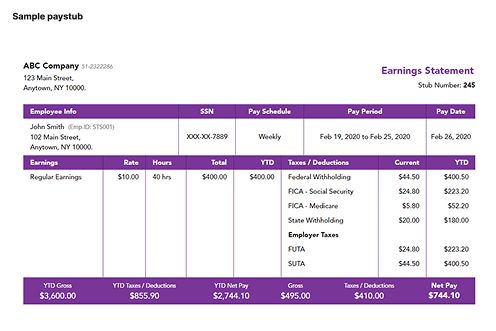
Every pay stub, regardless of the employer or payroll software used, is built around four core sections. Here's exactly how they lay out on a real stub:
1. Company & Statement Header
At the very top, you'll find the employer's name and address alongside the document title ("Earning Statement" or "Pay Stub"). This confirms which company issued the payment.
2. Employee & Pay Period Info
A row of fields identifies who the stub belongs to and when it covers:
- Employee Info: name, employee ID, and address
- SSN: usually masked, showing only the last 4 digits (e.g., XXX-XX-7889)
- Pay Schedule: weekly, bi-weekly, semimonthly, or monthly
- Pay Period: the exact date range worked (e.g., Jun 21 – Jul 04)
- Pay Date: the date payment was actually issued
3. Earning
This table shows how gross pay was calculated:
- Rate: hourly wage or salary rate
- Hours: hours worked in the period (e.g., 80 for a bi-weekly salaried employee)
- Current: the gross amount earned this period
Hourly employees may see multiple rows here (regular hours, overtime), while salaried employees typically see a single "Regular Earning" line.
4. Taxes / Deductions
Right next to earnings, this table lists everything withheld from gross pay, with both the current period amount and the YTD (year-to-date) total for each line:
- Federal Income Tax
- FICA: Medicare
- FICA: Social Security
- State and local taxes (where applicable)
- Voluntary deductions like health insurance or 401(k), if offered
5. Summary Bar
At the bottom, a totals bar ties everything together for both the current period and the year-to-date:
YTD Gross | YTD Taxes/Deductions | YTD Net Pay | Gross | Taxes/Deductions | Net Pay
Net pay is always calculated the same way:
Gross Pay − Taxes − Deductions = Net Pay
Having both the current-period and YTD figures side by side makes it easy to spot a payroll error early and to reconcile your final pay stub of the year against your W-2.
Sample Pay Stub Breakdown
Let's walk through a real example the way you'd actually build it with a pay stub generator, an hourly employee, paid biweekly, in California:
Setup:
- Employee: Alexander Caldwell (Emp. ID: STS001) | Hire Date: Jun 20, 2026
- Pay type: Hourly ($22.50/hr)
- Pay schedule: Biweekly (80 hours per period, no overtime)
- Pay period: Jun 21 – Jul 04, 2026 | Pay date: Jul 09, 2026
- Employee address: Lodi, CA (used for tax calculation, since "working from home" was selected)
- Federal Filing Status: Single | State Filing Status: Single
- W-4: 2020 or later version | Multiple Jobs/Spouse Works: not checked
- Special tax exemptions: none selected
- Direct deposit slip: added
Two details matter more than they look at first glance:
- Employee address vs. company address: if the employee works from home, taxes are calculated based on where they live, not where the company is registered. This matters most for multi-state employers, since it determines which state's income tax and SDI (if any) apply.
- Filing status (Federal + State): "Single," "Married Filing Jointly," or "Head of Household" changes the withholding tables used, so the same gross pay can produce a different Federal Income Tax line depending on this selection. Since this employee is on a 2020-or-later W-4 with no multiple-jobs box checked, the standard single-filer withholding table applies below.
Earning
| EarningRateHoursCurrent | |||
| Regular Earning | $22.50 | 80 | $1,800.00 |
Taxes / Deductions
| Taxes / DeductionsCurrentYTD | ||
| Federal Income Tax | $132.16 | $264.31 |
| California State Tax | $42.63 | $85.26 |
| SDI | $23.40 | $46.80 |
| FICA – Medicare | $26.10 | $52.20 |
| FICA – Social Security | $111.60 | $223.20 |
Summary
| Final | |||||
| $3,600.00 | $671.77 | $2,928.23 | $1,800.00 | $335.88 | $1,464.12 |
A few things worth noticing in this example:
- No special tax exemptions were selected, so all standard federal and state taxes apply. If an employee were exempt from something (e.g., a student exempt from FICA in some cases), that line would simply show $0.00 instead.
- California adds SDI (State Disability Insurance) on top of standard state income tax a detail employees in no-SDI states won't see on their stub, which is why the state selected during setup directly changes which deduction lines appear.
- The direct deposit slip is an optional add-on that appends a detachable section at the bottom of the PDF showing the net pay and a check number, useful if the stub needs to double as a physical record.
- YTD figures accumulate with each new stub generated for the same employee across pay dates, which is why they're always equal to or larger than the current-period amount.
What the Direct Deposit Slip Looks Like
When this option is enabled, a separate section appears below the main stub, marked off by a dashed "cut here" line with a scissors icon the same convention used on physical paycheck stubs where the check portion detaches from the earnings record. It includes:
- Employer name and a Check Number field (left blank for direct-deposit-only records, since no physical check was issued)
- Pay Date
- "Deposited to the Account of", the employee's name
- Amount shown two ways: the net pay written out in words (e.g., "One Thousand Five Hundred Thirty Dollars and Fifteen Cents") and the numeric figure, matching how a real bank check states an amount
- Bank Name, Routing Number, and Account Number all optional; if left blank they display as a dash, and if an account number is entered it's masked (e.g., "xxxxxxxx-well")
- A "This is not a check" watermark across the section, since it's a payroll record, not a negotiable instrument
Paper vs. Electronic Pay Stubs
Pay stubs come in two formats:
- Paper stubs physically attached to a printed paycheck. Still required in some states as an option, even if direct deposit is used.
- Electronic (digital) stubs accessed through an online payroll portal or emailed as a PDF. Increasingly the default, since they're faster to distribute and easier to store.
Some states require employers to let employees opt out of electronic-only delivery, so check your state's rules if you're an employer.
Why It Matters to Know What's on Your Pay Stub
Understanding your pay stub isn't just about curiosity it has real practical uses:
- Catching payroll errors: wrong tax withholding or missed overtime pay
- Proof of income: for rental applications, loans, or mortgages
- Tax filing: your YTD totals should match your W-2 at year-end
- Budgeting: knowing your real take-home pay, not just your salary
Need a Pay Stub Fast?
If you're self-employed, a contractor, or your employer doesn't provide stubs, you can generate a professional, accurate pay stub in minutes with our pay stub generator. Just enter your income and deduction details, and get an instant, ready-to-download PDF.
FAQ
Is a pay stub the same as a W-2?
No. A pay stub covers a single pay period; a W-2 summarizes your entire year's wages and withholdings for tax filing.
Do all states require employers to provide pay stubs?
No. A handful of states have no pay stub requirement at all, though most do. Some of those states also mandate that employees be allowed to opt out of electronic-only delivery.
How long should I keep my pay stubs?
At least one year, ideally two to three, especially if you're applying for a loan or mortgage soon. Your final pay stub of the year is also useful for double-checking that your W-2 matches.
What's the difference between gross pay and net pay?
Gross pay is your total earnings before any taxes or deductions are taken out. Net pay is what's left after federal, state, and FICA taxes, plus any voluntary deductions, are subtracted, it's the amount actually deposited into your account.
Can I use a pay stub as proof of income?
Yes. Pay stubs are one of the most commonly accepted forms of proof of income for rental applications, loan approvals, and mortgage underwriting, since they show both current earnings and year-to-date totals.
What if my employer doesn't give me a pay stub?
It depends on your state. In states that require pay stubs, ask HR or payroll directly, you may be entitled to one by law. If you're a contractor, freelancer, or self-employed and no employer is issuing stubs at all, you can generate your own using a pay stub generator.
Why does my pay stub show a Year-to-Date (YTD) column?
The YTD column tracks cumulative gross pay, taxes, and deductions from January 1st through the current pay period. It's what you'll use to verify your W-2 is accurate at tax time, and it updates automatically with every new stub.
Does every pay stub include SDI?
No. State Disability Insurance (SDI) only appears on stubs for employees in states that require it, such as California, New Jersey, New York, Rhode Island, and Hawaii. If your state doesn't have SDI, that line simply won't appear.
What does "Special Tax Exemptions" mean on a pay stub?
It means the employee has been marked as exempt from a specific tax, such as Federal Income Tax, Social Security, Medicare, or State tax, for a documented reason (for example, certain student or nonresident situations). When a tax is marked exempt, that line shows $0.00 instead of a withheld amount.
Alexander Caldwell – Financial Expert
Alexander Caldwell is a financial expert specializing in payroll management, with over 12 years of experience in the industry. He earned his bachelor's degree in finance from the University of California, Berkeley. Throughout his career, Alexander has worked with businesses of all sizes, helping them streamline payroll processes and ensure compliance with tax regulations. At Online Pay Stub, he is dedicated to providing accurate and reliable payroll solutions, making it easier for employees and businesses to manage their financial records efficiently.


Comments (0)
Loading comments...


