
Blog header

What Is a Payroll Card and How Does It Work?

Friday, Aug 7, 2026

· by Alexander Caldwell – Financial Expert
What Is a Payroll Card and How Does It Work?

A payroll card, also called a pay card, is a reloadable payment card that employers can use to pay employee wages electronically. Instead of receiving a paper paycheck or having wages deposited into a personal checking account, the employee's net pay is loaded onto the payroll card each payday.

The process is simple:

Employer runs payroll → taxes and deductions are calculated → net pay is loaded onto the payroll card → employee accesses the money using the card.

Payroll cards often work similarly to debit cards. Employees may be able to use them for everyday purchases, ATM withdrawals, online transactions, bill payments, and other transactions supported by the card provider.

However, a payroll card is not necessarily connected to the employee's personal bank account.

How Does a Payroll Card Work?

A payroll card works by giving employees electronic access to their wages through a prepaid card account.

When an employer offers payroll cards, it generally works with a financial institution or payroll provider that administers the program.

The typical process looks like this:

  1. The employer calculates the employee's gross wages.
  2. Payroll taxes and other deductions are subtracted.
  3. The employee's net pay is electronically deposited into the payroll card account.
  4. The employee accesses the available balance using the card.
  5. The process repeats on each payday.

Employees may receive a physical card that carries a payment network such as Visa or Mastercard, depending on the program.

The card can then typically be used anywhere supported by the card's payment network, subject to the issuer's terms.

What Can You Do With a Payroll Card?

Payroll cards can provide many of the everyday payment functions associated with a debit card.

Depending on the payroll card provider, employees may be able to:

  1. Make purchases in stores
  2. Make online purchases
  3. Withdraw cash from ATMs
  4. Check their available balance
  5. Pay bills
  6. Transfer funds
  7. Receive recurring wage deposits
  8. Review transaction history

The exact features depend on the card issuer.

Some cards also provide mobile apps or online dashboards where employees can manage their accounts and review recent transactions.

Do You Need a Bank Account to Use a Payroll Card?

No. One of the primary benefits of a payroll card is that an employee generally does not need a traditional checking account to receive wages through the card.

This makes payroll cards particularly relevant for employees who are unbanked or who prefer not to use a traditional bank account.

The money is stored in the account associated with the payroll card rather than deposited into the employee's personal checking account.

This does not necessarily mean payroll cards are better than bank accounts. Employees should compare fees, withdrawal options, ATM availability, transfer capabilities, and other features before choosing a payroll card.

The CFPB specifically recommends comparing prepaid accounts with alternatives such as traditional bank accounts.

Payroll Card vs. Direct Deposit

The main difference between a payroll card and direct deposit is where the employee's wages are deposited.

With direct deposit, wages usually go to a bank or credit union account selected by the employee.

With a payroll card, wages are deposited into the prepaid account associated with the payroll card.

Payroll CardDirect Deposit
Wages go to a prepaid card accountWages go to a checking, savings, or other eligible account
Traditional bank account may not be requiredUsually requires an eligible financial account
Money is accessed through the payroll cardMoney is accessed through the employee's bank
Fees depend on the card programFees depend on the employee's bank account
May be arranged through the employerEmployee generally provides account details

Both methods allow employees to receive wages electronically.

The better option depends on the employee's financial situation and the terms of each service.

Payroll Card vs. Debit Card

A payroll card may look like a debit card, but the two are not necessarily the same.

A traditional debit card is normally connected directly to a checking or similar bank account.

A payroll card is generally connected to a prepaid account used to receive wages.

With both cards, the user generally spends money already available in the associated account rather than borrowing money.

The CFPB explains that prepaid cards typically allow consumers to spend funds that have already been loaded into the account.

Payroll Card vs. Prepaid Card

A payroll card is a type of prepaid card specifically designed to receive employee compensation.

A general prepaid card, by comparison, can be loaded with money for many different purposes and may have no connection to an employer.

The key distinction is the source and purpose of the funds.

Payroll card: primarily receives wages from an employer.

General prepaid card: can be funded independently by the cardholder or through other sources.

Payroll cards are also subject to specific federal protections related to payroll card accounts.

How Do You Get Paid With a Payroll Card?

Your employer electronically deposits your net wages into the payroll card account on payday.

Before this happens, payroll is still processed in the normal way.

For example, the employer may calculate:

  1. Regular wages
  2. Overtime
  3. Bonuses
  4. Commissions
  5. Gross pay
  6. Federal taxes
  7. State and local taxes
  8. Benefits
  9. Other payroll deductions
  10. Net pay

The resulting net pay is then deposited into the payroll card account.

Using a payroll card therefore changes how you receive your wages, not how payroll itself is calculated.

Do You Still Get a Pay Stub With a Payroll Card?

Receiving wages through a payroll card does not eliminate the importance of your payroll records.

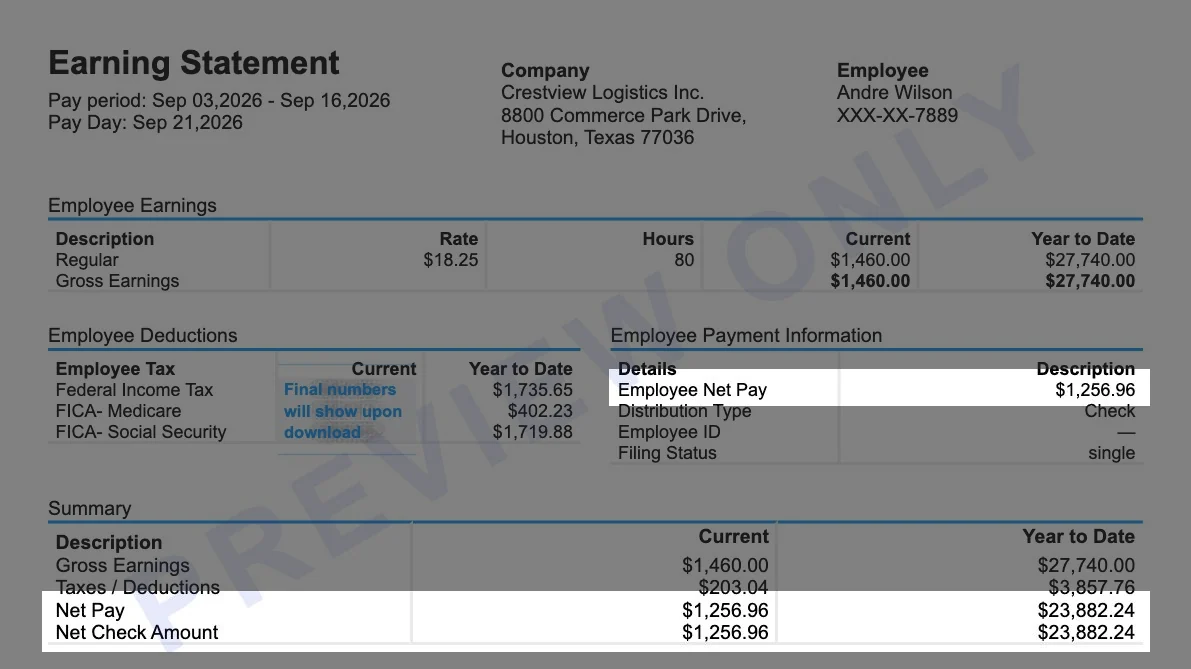
A payroll card shows how you receive your net wages, while a pay stub explains how those wages were calculated.

A pay stub may show information such as:

  1. Employer information
  2. Employee information
  3. Pay period
  4. Pay date
  5. Gross earnings
  6. Taxes
  7. Payroll deductions
  8. Net pay
  9. Year-to-date earnings

For employers and employees who need to organize legitimate payroll information into a clear pay statement, the Online PayStub generator can be used to create a professional pay stub based on actual payroll records.

The payroll card and pay stub serve different purposes. The card provides access to wages, while the pay stub provides a record of the payroll calculation.

How Do You Withdraw Money From a Payroll Card?

Employees can commonly withdraw money from payroll cards through participating ATMs.

Some programs may also offer other ways to access cash, such as participating financial institutions or cash-back transactions at retailers.

However, withdrawal rules vary by card.

Before using an ATM, check:

  1. Which ATM network the card uses
  2. Whether certain ATMs are fee-free
  3. Daily withdrawal limits
  4. Out-of-network ATM fees
  5. ATM operator fees
  6. Other cash withdrawal options

Selecting an in-network ATM may help reduce or avoid withdrawal charges.

Can You Withdraw Your Entire Paycheck From a Payroll Card?

It may be possible, but withdrawal limits and methods depend on the specific payroll card program.

ATMs commonly have daily withdrawal limits, which may prevent you from withdrawing the entire balance in one transaction.

Some payroll card programs provide alternative ways to access the full amount of your wages.

Because state wage laws may also affect how employees must be allowed to access their earnings, check the cardholder agreement and applicable state rules.

The CFPB notes that many states require employees to have some method of accessing their wages without a fee.

Can You Transfer Money From a Payroll Card to a Bank Account?

Some payroll cards allow transfers to an external bank account, but this feature is not universal.

If transfers are supported, you may need to provide:

  1. Bank routing number
  2. Account number
  3. Account type
  4. Identity verification

Transfer times and fees can vary.

Check your card provider's mobile app, website, or cardholder agreement to determine whether bank transfers are available.

Can You Use a Payroll Card at an ATM?

Yes, most payroll cards can be used at ATMs supported by the card's network.

However, ATM fees are one of the most important terms to review before selecting a payroll card.

Your card may provide:

  1. Free in-network withdrawals
  2. Limited free withdrawals per pay period
  3. Out-of-network withdrawal fees
  4. Balance inquiry fees
  5. International ATM fees

The specific structure depends on the issuer.

Are There Fees for Payroll Cards?

Payroll cards can have fees, although the specific charges vary considerably between programs.

Potential fees may include:

  1. Out-of-network ATM fees
  2. ATM balance inquiry fees
  3. Replacement card fees
  4. Inactivity fees
  5. International transaction fees
  6. Certain transfer fees
  7. Other optional service fees

The CFPB states that prepaid payroll cards may charge fees for certain features and that employees should receive disclosures explaining the applicable fees before agreeing to the program.

This makes it important to read both the short-form fee disclosure and the full cardholder agreement.

How Can You Avoid Payroll Card Fees?

The easiest way to reduce payroll card fees is to understand the program's fee schedule and use free services whenever possible.

For example, you may be able to:

  1. Use in-network ATMs
  2. Avoid unnecessary balance inquiries at ATMs
  3. Check balances through a free mobile app
  4. Use free cash-back options where available
  5. Avoid international transactions
  6. Use available fee-free withdrawal methods

Fee structures vary, so the best approach depends on the specific card.

Can Your Employer Force You to Use a Payroll Card?

Under federal consumer protection rules, an employer cannot require an employee to receive wages only through a payroll card selected by the employer.

The CFPB states that employers offering payroll cards must provide at least one alternative way for employees to receive their wages.

That alternative might be:

  1. Direct deposit to an account chosen by the employee
  2. A paper paycheck
  3. Another legally permitted wage-payment method

Some states allow employers to require electronic payment, but employees still retain protections regarding where their wages are deposited.

State employment laws may provide additional protections.

Are Payroll Cards Safe?

Payroll cards can provide important consumer protections, but employees should still take normal security precautions.

Federal rules under Regulation E apply to payroll card accounts and provide protections related to electronic transactions and account errors.

Cardholders should:

  1. Keep their PIN private
  2. Use secure ATMs
  3. Review transactions regularly
  4. Protect account login credentials
  5. Report suspicious transactions quickly
  6. Contact the issuer immediately if the card is lost

Some protections can depend on account registration and how quickly unauthorized activity is reported.

What Happens If You Lose Your Payroll Card?

Contact your payroll card provider immediately if the card is lost or stolen.

The issuer can generally block the existing card and arrange a replacement.

Federal rules provide certain error-resolution protections for payroll card accounts, including protections involving unauthorized transactions.

The CFPB recommends contacting the provider immediately after discovering a lost card, stolen PIN, or suspicious transaction because delays can affect your responsibility for unauthorized charges.

There may also be a replacement-card fee depending on the program.

Is Money on a Payroll Card Protected?

Payroll cards are covered by federal consumer protections relating to electronic fund transfers.

Additional protection can depend on the financial institution holding the funds and how the program is structured.

Some prepaid accounts may also qualify for FDIC or NCUA deposit insurance if the required conditions are met.

The CFPB notes that registering eligible prepaid accounts can be important for receiving applicable deposit insurance and certain protections.

Employees should check their cardholder agreement for details about how funds are held and protected.

Can Your Employer See What You Buy With a Payroll Card?

A payroll card should not be thought of as an employer-controlled shopping account simply because your employer uses it to pay your wages.

The financial institution or card provider manages the card account and transaction processing.

Employers normally need payroll information to deposit your wages, but employees concerned about transaction privacy should review the privacy notice and cardholder agreement supplied by the payroll card provider.

How Long Does It Take for Pay to Appear on a Payroll Card?

Wages are generally scheduled to become available according to the employer's normal payroll schedule.

If payday is Friday, for example, payroll funds would generally be made available according to the employer and card provider's established deposit process.

The exact timing can depend on:

  1. Employer payroll processing
  2. Payroll provider
  3. Card issuer
  4. Pay schedule
  5. Holidays
  6. Processing errors

If your expected wages are missing, first confirm that payroll was processed correctly with your employer.

Why Hasn't My Paycheck Appeared on My Payroll Card?

A missing payroll card deposit can result from several issues.

Possible reasons include:

  1. Payroll was submitted late
  2. Employer payroll information is incorrect
  3. The card has not been activated
  4. Account information changed
  5. The payroll provider experienced a processing issue
  6. A holiday affected processing
  7. The employee recently enrolled in the payroll card program

Start by checking the payroll card account and your pay statement.

Then contact your employer's payroll department if the payment is still missing.

Can You Use a Payroll Card for Online Purchases?

Many payroll cards can be used for online purchases if they operate on a major payment network and online transactions are enabled.

You generally enter the card information the same way you would when using a debit card.

However, some merchants may place temporary authorization holds, particularly for:

  1. Hotels
  2. Rental cars
  3. Gas stations
  4. Subscription services

Because only the available balance can typically be spent, these holds can temporarily reduce the amount available on the card.

Can You Pay Bills With a Payroll Card?

Many payroll cards can be used to pay bills.

Depending on the issuer, you may be able to:

  1. Pay bills using the card number
  2. Set up recurring payments
  3. Use an online bill-pay service
  4. Transfer money to another account

Availability and potential fees depend on the payroll card program.

What Happens to Your Payroll Card When You Leave Your Job?

Leaving your employer does not necessarily mean the balance on your payroll card disappears.

Money that has already been deposited represents wages that have already been paid into the card account.

However, the rules governing future use of the account may depend on the card provider.

After leaving an employer, check:

  1. Whether the card remains active
  2. Whether fees change
  3. How long the account remains open
  4. Whether you can continue making purchases
  5. Whether you can transfer the remaining balance
  6. How to withdraw the remaining funds

It can be useful to transfer or withdraw the remaining balance if the account will no longer receive payroll deposits.

Advantages of Payroll Cards

Payroll cards can provide a convenient electronic wage-payment option, particularly for employees without traditional bank accounts.

Potential benefits include:

  1. No traditional checking account required
  2. Electronic access to wages
  3. Reduced dependence on paper checks
  4. Ability to make card purchases
  5. ATM access
  6. Online account management
  7. Potential bill-payment options
  8. Easier access to wages for some unbanked employees

For employers, payroll cards can also reduce the administrative burden associated with issuing paper checks.

Disadvantages of Payroll Cards

Payroll cards are not automatically the best choice for every employee.

Potential disadvantages include:

  1. ATM fees
  2. Limited fee-free ATM networks
  3. Replacement-card fees
  4. Possible transfer restrictions
  5. Different account features between providers
  6. Withdrawal limits
  7. Potential inactivity or service fees
  8. Less flexibility than some traditional checking accounts

The CFPB recommends reviewing fee disclosures carefully before choosing a prepaid payroll option.

Payroll Card Pros and Cons

ProsCons
No traditional bank account requiredSome transactions may have fees
Electronic wage paymentsATM network may be limited
Can usually make purchasesWithdrawal limits may apply
May support online purchasesFeatures vary by provider
May provide ATM accessOut-of-network ATMs can cost more
Convenient alternative to paper checksTransfers may not always be free

Whether a payroll card is a good choice depends largely on how the employee plans to access and use their wages.

Payroll Card vs. Paper Check

Payroll cards provide electronic access to wages, while paper checks require the employee to deposit or cash the check.

A payroll card can therefore reduce the need to visit a bank or check-cashing business.

Paper checks, however, may be preferred by employees who do not want to use a payroll card or who already have another system for managing their wages.

Employers must follow applicable federal and state wage-payment rules when determining available payment options.

Payroll Cards and Pay Stubs Serve Different Purposes

A payroll card delivers wages, while a pay stub documents how those wages were calculated.

These two payroll records should not be confused.

For example:

Payroll card: gives the employee access to 1,850 dollars in net wages.

Pay stub: explains how gross earnings became the 1,850 dollar net payment after taxes and deductions.

A complete pay stub can include gross earnings, federal and state withholding, benefits, deductions, net pay, and year-to-date totals.

If you are an employer or are responsible for legitimate payroll records, Online PayStub can help organize that payroll information into a professional pay stub format.

Using an online pay stub generator can simplify documentation, but every figure should always reflect the employee's actual payroll records.

Frequently Asked Questions About Payroll Cards

What is a payroll card?

A payroll card is a prepaid payment card that an employer can use to electronically deposit an employee's net wages.

Is a payroll card the same as a debit card?

Not exactly. A traditional debit card is usually linked to a checking account, while a payroll card is generally linked to a prepaid account that receives wages.

Do I need a bank account for a payroll card?

No. Payroll cards can generally be used without opening a traditional personal bank account.

Can I use a payroll card anywhere?

Many payroll cards operate on major payment networks and can be used at merchants that accept that network. Specific restrictions depend on the issuer.

Can I withdraw money from my payroll card?

Yes, payroll cards commonly support ATM withdrawals. Fees and withdrawal limits vary by provider.

Can I transfer payroll card money to my bank?

Some cards support bank transfers, although transfer availability, processing time, and fees depend on the provider.

Do payroll cards charge fees?

They can. Possible charges include ATM, replacement card, inactivity, international transaction, and certain service fees. Employers and card providers must provide relevant fee information.

Can my employer require me to use a payroll card?

An employer cannot require you to receive wages only through the payroll card it selects. Another payment option must generally be available.

What happens if my payroll card is stolen?

Contact the card provider immediately. Payroll card accounts have federal protections for certain unauthorized electronic transactions, but prompt reporting is important.

Do I still receive a pay stub with a payroll card?

A payroll card and a pay stub perform different functions. The payroll card provides access to wages, while the pay stub records earnings, taxes, deductions, and net pay.

Can I use my payroll card after quitting?

You may be able to continue using the remaining balance, but account terms after employment ends depend on the card program. Review the cardholder agreement or contact the provider.

Is a payroll card a credit card?

No. Payroll cards generally allow you to spend money already available in the prepaid account rather than borrowing money as you would with a traditional credit card.

Final Thoughts


A payroll card is an electronic wage-payment method that allows an employer to deposit an employee's net pay into a prepaid card account.

Once the wages are deposited, employees can typically use the card for purchases, ATM withdrawals, online payments, and other supported transactions without needing a traditional checking account.

However, payroll cards can come with fees, withdrawal limits, ATM restrictions, and other conditions. Employees should compare those terms with alternatives such as direct deposit before deciding which payment method works best for them.


Federal consumer protections also matter. Employers generally cannot force employees to receive wages only through an employer-selected payroll card, and payroll card providers must disclose applicable fees and terms.

Finally, remember that a payroll card and a pay stub are not the same thing. The card provides access to your wages, while the pay stub explains how those wages were calculated.

For employers and individuals responsible for legitimate payroll records,


Online PayStub makes it easier to create clear and professional pay stubs using accurate employee, earnings, tax, and deduction information.

Alexander Caldwell – Financial Expert

Alexander Caldwell – Financial Expert

Alexander Caldwell is a financial expert specializing in payroll management, with over 12 years of experience in the industry. He earned his bachelor's degree in finance from the University of California, Berkeley. Throughout his career, Alexander has worked with businesses of all sizes, helping them streamline payroll processes and ensure compliance with tax regulations. At Online Pay Stub, he is dedicated to providing accurate and reliable payroll solutions, making it easier for employees and businesses to manage their financial records efficiently.

Sample Paystub
Enter Your Information icon

Enter Your Information

Download Your Stub! icon

Download Your Stub!

LogoCreate Online Paystub

Comments (0)

Loading comments...

Leave a Comment

0/2000