Georgia Paystub Generator
Build a Georgia paystub using the 4.99% flat rate from HB 463, Form G-4 allowances and unemployment tax the employer pays on the first $9,500.
 Create Your Georgia Pay Stub
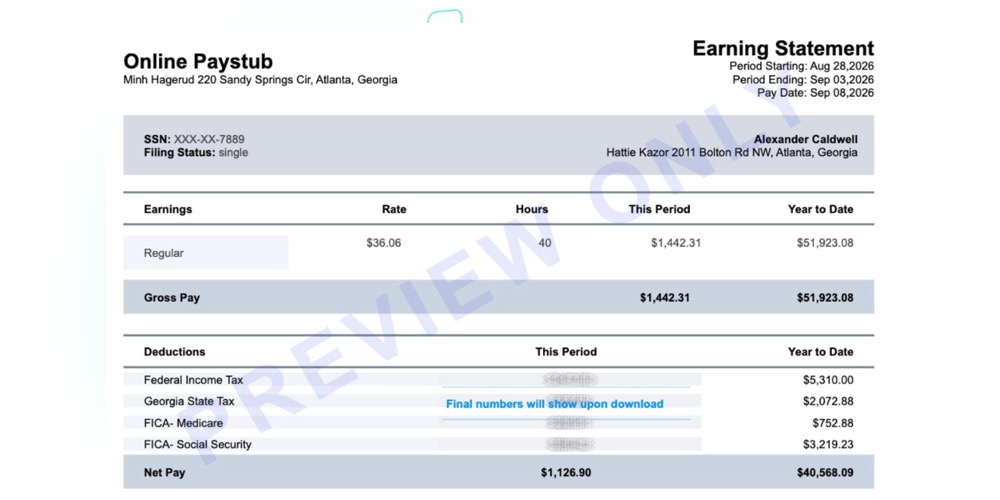
Georgia Paystub Generator
Georgia runs a flat withholding rate that changed partway through 2026 and the state has no statute requiring a wage statement at all, which makes an accurate payroll record even more important to keep on your own. Our generator applies the current flat rate and Form G-4 allowances automatically.
Enter your payroll details, review the calculated result and make any changes before you download. You stay in control of every figure on the document.
See how it works
Watch the quick video to see how easy you can create and download your pay stub in minutes.
Georgia ran on two different withholding rates during 2026. Employers withheld at 5.19% through the first half of the year and at 4.99% from July 1 forward, after House Bill 463 cut the flat rate retroactive to January 1. Any Georgia paystub you produce for a check dated in the second half of the year needs the newer rate on the current line, while the year-to-date column still carries what came out earlier. That single quirk is why generic templates are producing wrong Georgia pay stubs this year and it is the first thing this tool gets right.
Why the Georgia Withholding Rate Changed Midway Through 2026
Governor Brian Kemp signed HB 463 on May 11, 2026. Two consequences land on the document you build and the wider Georgia payroll record rules sit on the state hub.
What House Bill 463 Actually Cut
It dropped the flat individual income tax rate from 5.19% to 4.99% and lifted the standard deduction to $15,000 for single, head of household and married filing separately filers and $30,000 for married filing jointly. The dependent deduction went from $4,000 to $5,000 and the Georgia Department of Revenue reissued its Employer’s Withholding Tax Guide in June 2026 with corrected tables.
Does a Spring 2026 Pay Stub Showing 5.19% Mean an Error?
No. Checks dated January through June 2026 were legitimately withheld at the older rate and any excess gets reconciled when the employee files the annual return. A spring pay stub showing 5.19% is history, not an error to be scrubbed.
How Georgia Now Treats Qualified Overtime and Cash Tips
Georgia now excludes qualified overtime compensation and certain cash tips from taxable income through 2028 and employers must report those amounts with the year-end income statements. Clean overtime and tip tracking on every pay stub is now a reporting requirement, not a nicety.
What the Georgia Paystub Generator Asks You to Enter
Georgia withholding is not 4.99% of gross. The flat rate applies to Georgia taxable income, so the calculation subtracts a standard deduction and any claimed allowances before the rate touches anything. The generator asks for a short set of inputs and does the annualizing.
The Four Input Blocks
Each block maps to a document you already hold.
Employer Block: Name, Address and Withholding Number
Legal business name, Georgia address and the Department of Revenue withholding number. If you file Form G-7 quarterly or remit with Form GA-V, the number on those filings belongs here.
Employee Block: Form G-4 Status and Allowances
Name, address and the Form G-4 details. The current G-4 (revision 06/03/26) carries four marital status options, a dependent allowance count, a worksheet-driven additional allowances line and a flat extra-withholding amount per period. With no G-4 on file, Georgia’s default is single with zero allowances and the generator does exactly that if you leave the field blank.
Pay Block: Hours, Rate, Frequency and Check Date
Period start and end, check date, pay frequency, regular hours, overtime hours, base rate and any tips, shift differential or nondiscretionary bonus. The check date selects the rate, not the period end date.
Deduction Block: Pre-Tax Versus Post-Tax Items
Anything pre-tax reduces Georgia wages before the rate is applied. Anything post-tax does not.
What the Finished PDF Contains
The output is a one-page document with current and year-to-date columns, hours and rate shown separately for regular and overtime and every deduction on its own line. Preview the whole paystub before paying.
Worked Example: A Salaried Weekly Paycheck
Here is a full weekly stub for a salaried single-filer employee in Atlanta earning $75,000 a year, or $1,442.31 a week, with 40 hours and no overtime for the period.
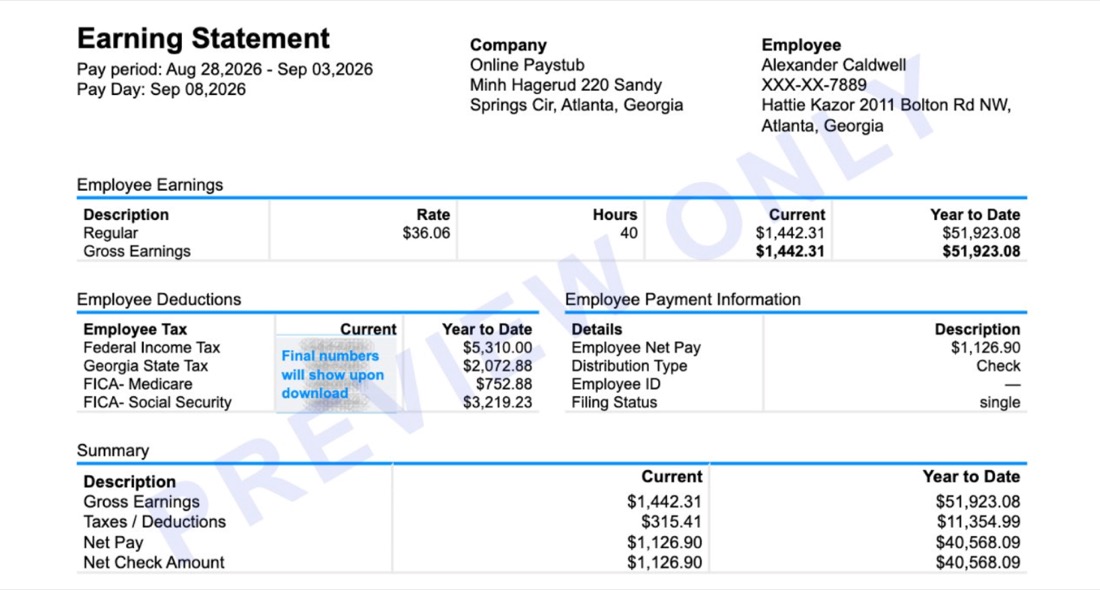
| Earnings | Hours | Rate | Current | YTD |
|---|---|---|---|---|
| Regular | 40.00 | $36.06 | $1,442.31 | $51,923.08 |
| Gross pay | 40.00 | $1,442.31 | $51,923.08 |
| Deductions | Current | YTD |
|---|---|---|
| Federal income tax | $147.51 | $5,310.00 |
| Georgia state tax | $57.57 | $2,072.88 |
| Medicare (1.45%) | $20.91 | $752.88 |
| Social Security (6.2%) | $89.42 | $3,219.23 |
| Total deductions | $315.41 | $11,354.99 |
| Net pay | $1,126.90 | $40,568.09 |
Federal withholding depends on the employee's W-4, so treat that line as illustrative. FICA is fixed, and the Georgia line follows the flat rate applied to taxable wages after standard deduction and allowances.
How Much Georgia Tax Comes Out of a Biweekly Atlanta Paycheck
Take a picker at a distribution center off I-285, paid $19.50 an hour biweekly, single with no dependents and no pre-tax deductions. This period she worked 80 regular hours and 7 overtime hours at time and a half.
The Deduction Breakdown for 87 Hours Paid
| Line | Calculation | Amount |
|---|---|---|
| Regular earnings | 80 x $19.50 | $1,560.00 |
| Overtime earnings | 7 x $29.25 | $204.75 |
| Gross pay | $1,764.75 | |
| Social Security (6.2%) | $1,764.75 x 0.062 | $109.41 |
| Medicare (1.45%) | $1,764.75 x 0.0145 | $25.59 |
| Georgia withholding | see below | $59.27 |
| Federal income tax | from her W-4 and IRS Publication 15-T, assumed here | $121.00 |
| Total deductions | $315.27 | |
| Net pay | $1,449.48 |
Building the Georgia Withholding Line Step by Step
The Georgia line is built in three moves, repeatable for any wage in the Georgia paycheck calculator.
Step 1: Annualize the Gross Pay
$1,764.75 x 26 pay periods = $45,883.50.
Step 2: Subtract the $15,000 Standard Deduction
That leaves $30,883.50 of Georgia taxable income.
Step 3: Apply 4.99% and Divide Across 26 Periods
Annual tax of $1,541.09, divided by 26 periods, is $59.27 in this check. That is roughly 3.4% of gross, not 4.99%, which is why so many hand-built Georgia pay stubs come out too high.
Why the Federal Income Tax Row Is an Assumption
The federal income tax figure above is an assumption, because that line depends on the employee’s W-4 and the IRS tables rather than a fixed percentage. Every other row is a rule you can verify.
Georgia Payroll Taxes the Employer Pays and the Worker Never Sees
Is There a State Disability or Paid Leave Deduction in Georgia?
No. Georgia has no employee-funded state payroll program. There is no state disability deduction, no paid family leave contribution and no employee share of unemployment insurance. The Georgia Department of Labor states plainly that employers pay the entire cost of unemployment insurance benefits.
The $9,500 Unemployment Wage Base and Your DOL-626 Rate
The state unemployment taxable wage base stays at $9,500 per employee per year, unchanged since 2013 and newly liable employers start at 2.70% until they have enough history for an experience rating. Your assigned rate arrives on the annual DOL-626 notice through the Employer Portal and already includes the administrative assessment portion, so use the total. Wages get reported quarterly on Form DOL-4N, due April 30, July 31, October 31 and January 31.
Where Employer Costs Belong on the Printed Page
These belong in an employer-contribution area or nowhere at all. If a Georgia worker sees a state unemployment amount subtracted from gross pay, that is a genuine error worth raising.
Georgia Check Stub Codes and Abbreviations, Decoded
Georgia publishes no official code list and no statute standardizes labels, so the same deduction appears under different abbreviations depending on which payroll system printed it. Where a label is provider-specific, this table says so.
The Georgia Deduction Code Table
| Code you may see | What it means | Verify it against |
|---|---|---|
| GA GWH, GAWH, GA W/H | Georgia state income tax withheld. “GWH” is a provider-built label from “Georgia withholding,” not a state-defined code, which is why searching for it turns up nothing official. | Year-to-date should match the state income tax box on your W-2 |
| GA SIT, GA SWH, SITW, GA SWT | The same Georgia state income tax under a different vendor abbreviation | Same as above |
| FIT, FWH, FED W/H | Federal income tax withheld under your W-4 | IRS Publication 15-T tables |
| OASDI, FICA-SS, SS EE | Social Security, 6.2% of wages up to $184,500 in 2026 | Maximum employee share of $11,439.00 for the year |
| MED, FICA-MED, FED MED/EE | Medicare, 1.45% with no wage cap | Should equal 1.45% of gross every period |
| ADD MED, ADDL MED, MED SUR | Additional Medicare, 0.9% on wages above $200,000 in a calendar year | Only appears late in the year, if at all |
| GA SUI ER, SUTA ER, UI ER | Employer unemployment contribution on the first $9,500 | Employer cost only, never subtracted from your net |
| FUTA ER | Federal unemployment, employer cost only | Should not reduce your pay |
| QUAL OT, OT EXCL | Qualified overtime compensation tracked separately for the HB 463 exclusion | Reported with your year-end income statement |
| DEC TIP, CASH TIP | Declared cash tips, tracked for both FICA and the Georgia tip exclusion | Your tip declarations for the period |
| ALLOW, G4 ALLOW | The allowance count from your Form G-4, shown for reference | Line 4 and line 5 of the G-4 you filed |
Two Lines That Should Never Appear on a Georgia Paystub
Two absences matter as much as the rows above.
No Local Income Tax Line
No Georgia city or county levies a wage income tax, so a local tax row belongs to some other jurisdiction. Ask which one.
No State Disability Code
Georgia funds no state disability program out of wages, so nothing here maps to such a code.
Who Needs a Georgia Paycheck Stub Maker
Employers Running Hourly Crews
Three industries drive most of the volume.
Restaurant and Hospitality Operators
Buckhead and Midtown kitchens run tipped and non-tipped staff on one payroll and the 2026 tip reporting rules require the tip line to stay separate rather than folded into gross.
Warehouse, 3PL and Logistics Employers
The corridor around Hartsfield-Jackson and the Savannah port district runs weekly overtime for crews of ten to forty. Hours-and-rate detail on the paycheck stub keeps a wage dispute from becoming a guessing match.
Staffing Agencies Placing Crews in Augusta, Macon and Columbus
One worker may sit on two client sites in a single pay period and needs the split shown.
Contractors, the Self-Employed and Household Employers
If you invoice rather than draw wages, your own books document what you took as owner pay. No Georgia withholding line applies to a true 1099 relationship, so the generator lets you leave it off. Household employers in Cobb, DeKalb and Gwinnett who pay a nanny or caregiver need the same clean quarterly trail.
Mistakes That Show Up on Georgia Payroll Stubs
Calculation Mistakes
- Applying 4.99% straight to gross pay. The deduction subtracts first, so the effective rate on a mid-wage hourly job usually lands between 3% and 4.5%.
- Using the pay period end date to pick the rate instead of the check date.
- Leaving the dependent deduction at $4,000 after HB 463 raised it to $5,000.
- Deducting unemployment insurance from the employee.
Layout and Template Mistakes
- Blending regular and overtime into a single earnings line, which breaks both the federal recordkeeping rule and the new Georgia overtime reporting.
- Reusing an out-of-state paycheck stub template that carries a local tax row Georgia does not have.
Using This Georgia Paystub Tool Responsibly
This tool exists to document pay that was actually earned and actually paid. Enter the hours the person worked, the rate they were promised and the amounts you genuinely withheld and remitted to the Department of Revenue and the Department of Labor. A Georgia payroll stub is a business record and in a wage dispute where the employer holds the only file it is often the record that decides the outcome. Anything that does not match your bank and tax filings helps nobody.
Nearby State Pay Stub Resources
Create a pay stub for a nearby state or one of our most popular states.


Frequently Asked Questions
What is GA GWH on my check stub?
It is Georgia state income tax withheld from that paycheck. “GWH” is short for Georgia withholding and is a label chosen by the payroll software, not a code set by the state, which is why you will not find it in any Department of Revenue publication. Check that the year-to-date figure next to it matches the state income tax amount reported on your W-2.
Is Georgia state income tax a flat rate for 2026?
Yes. Georgia moved to a single flat rate years ago and reduced it again this year, to 4.99% effective for tax years beginning January 1, 2026 under HB 463. The rate is flat, but the amount withheld from your check is not a flat percentage of gross, because the standard deduction and your G-4 allowances come out first.
How much Georgia tax comes out of a $19.50 an hour job?
Using the biweekly example above with 87 hours paid, about $59 per check for a single filer with no dependents. Raise the dependent count on your Form G-4 and it falls; claim zero allowances and it rises.
Do I still need a Form G-4 if I already filled out a federal W-4?
Yes. Georgia runs its own certificate. Without a G-4 on file, your employer withholds as single with zero allowances, which is usually the highest amount. Employers also have to forward to the Department of Revenue any G-4 claiming more than 14 allowances or claiming exempt.
Does unemployment insurance come out of my paycheck in Georgia?
No. Georgia unemployment insurance is funded by employers only. Any unemployment figure on your payroll stub should sit in an employer-cost section and should not change your net pay.
Can I generate a Georgia paystub for a tipped restaurant job?
Yes and you should keep tips on a separate earnings line rather than merging them into hourly wages. Georgia’s temporary exclusion for cash tips runs through 2028 and has to be reported at year end, so the split needs to exist in your records from the first pay period.