Connecticut Paystub Generator
Connecticut is one of the few states that spells out what a pay stub must contain: hours worked, straight time and overtime on separate lines, every deduction itemized and net earnings. It is also the state where a fifth deduction sits next to the usual four, the 0.5 percent CT Paid Leave contribution, and where most employees are paid weekly by law. This generator builds a wage statement around those rules. Enter the pay period, hours and rate, set the CT-W4 withholding code, preview the full statement free and download the PDF for a Hartford landlord, a Stamford lender or your own payroll file.
 Create Your Connecticut Paystub
Free preview · CT income tax, CT Paid Leave and FICA itemized · Instant PDF
Why Connecticut Employers and Workers Use Online Paystub
Payroll in the Constitution State carries more state-level detail than most. Income tax runs through seven graduated brackets from 2 to 6.99 percent and is withheld according to the code the employee picks on Form CT-W4. Every paycheck also funds the Connecticut Paid Leave program through a 0.5 percent employee contribution that stops at the Social Security wage base and must appear as its own deduction. Wages are due weekly unless the Department of Labor has approved a longer cycle, and the wage statement itself is regulated: hours, straight time and overtime shown separately, itemized deductions and net earnings, delivered on paper or electronically with the employee's consent. Cities and towns add no income tax, unemployment insurance is employer-funded and there is no state disability tax, so the deductions block stays predictable. Online Paystub arranges those elements the way a New Haven leasing office, a Bridgeport credit union or a wage investigator at the Connecticut DOL expects to read them, with current and year-to-date columns that reconcile to the dollar. Preview the statement at no cost, adjust anything that is off and download the PDF as proof of income or as a payroll record.
See a sample Connecticut pay stub →Watch How to Make a Connecticut Pay Stub From Start to Finish
Watch us fill in company and employee details, review the totals and export a Connecticut pay stub as a PDF.
The Five Deductions Every Connecticut Pay Stub Should Show
Most states leave four tax lines on an employee's stub. Connecticut adds a fifth. Here is what each one is, where it comes from and how to check it.
Federal Income Tax (Form W-4)
The largest deduction for most workers and the only one that varies by personal circumstances. It follows the employee's federal W-4: filing status, dependents, other income and any extra amount requested. Two Connecticut employees on identical wages can show different federal lines and both be right.
Connecticut State Income Tax: 2% to 6.99% by CT-W4 Withholding Code
Connecticut taxes wages on a graduated scale. For 2026 the brackets run from 2 percent on the first portion of taxable income through 4.5, 5.5, 6, 6.5 and 6.9 percent to a top rate of 6.99 percent on the highest incomes, with a personal exemption that phases out as income rises. Withholding is calculated from the tables that match the employee's CT-W4 withholding code, so the state line on a stub reflects both wages and that code. Applying a single percentage to gross pay is not how the state computes it.
CT Paid Leave Contribution: 0.5% Up to the Social Security Wage Base
Since 2021 every covered Connecticut employee contributes one half of one percent of wages to the Connecticut Paid Leave Authority trust fund. The employer withholds it and remits it quarterly; there is no employer share. The contribution stops once the employee's wages for the year pass the Social Security wage base. On the stub it is a separate deduction line, usually labeled CT Paid Leave, CTPL or CT PFML. It is the line most often missing from stubs built on generic templates, and its absence is the fastest way a Connecticut reviewer spots one.
Social Security 6.2% and Medicare 1.45%
Social Security is withheld at 6.2 percent of covered wages until the annual wage base is reached. Medicare is 1.45 percent with no cap, plus an additional 0.9 percent above $200,000. Because both are flat percentages, the YTD figure is a clean multiple of the current figure whenever pay is constant; use that to spot a hand-edited stub.
What Is Not There: No Local Tax, No SDI, No Employee Unemployment
Connecticut towns levy no income tax on wages. Unemployment insurance is paid by employers to the Department of Labor and never appears as an employee deduction. There is no state disability insurance program. A stub with a "local tax" or "SDI" row for a Connecticut worker was built with another state's template.
What Connecticut Law Requires on a Wage Statement (§ 31-13a)
Connecticut General Statutes § 31-13a requires employers to give each employee, with every wage payment, a record of the hours worked, gross earnings, itemized deductions and net earnings.
Hours Worked and Straight Time vs. Overtime on Separate Lines
For non-exempt employees, gross earnings must show straight-time pay and overtime pay as separate entries. A single "regular" line that silently includes overtime hours does not satisfy the statute. Exempt salaried employees, who receive no overtime, show salary without hours.
Itemized Deductions and Net Earnings
Each deduction is listed on its own line with its amount: federal tax, state tax, CT Paid Leave, Social Security, Medicare, then any voluntary deductions such as health premiums or retirement contributions. Net earnings, the amount actually paid, closes the statement. Lumping deductions under "taxes" or "other" is not itemization.
Electronic Pay Stubs and Employee Consent
Employers may deliver the statement electronically if the employee has explicitly consented and can access and print it. Otherwise it is provided on paper. Employers must keep wage records for three years.
Connecticut Pays Weekly: Pay Period and Payday Rules
Weekly by Default, Biweekly Only With DOL Approval
Connecticut requires wages to be paid weekly, on a regular payday no later than eight days after the end of the pay period. An employer may pay biweekly or less often only with written approval from the Connecticut Department of Labor. Many established employers hold that approval and run biweekly payroll, which is why the sample below shows a two-week period. A weekly schedule remains the legal default for anyone without it.
Final Paycheck: Next Business Day After Discharge
An employee who is fired must receive all wages owed by the next business day. An employee who quits is paid on the next regular payday. Final stubs therefore often have to be produced off-cycle.
Sample Connecticut Paystub Generator Output
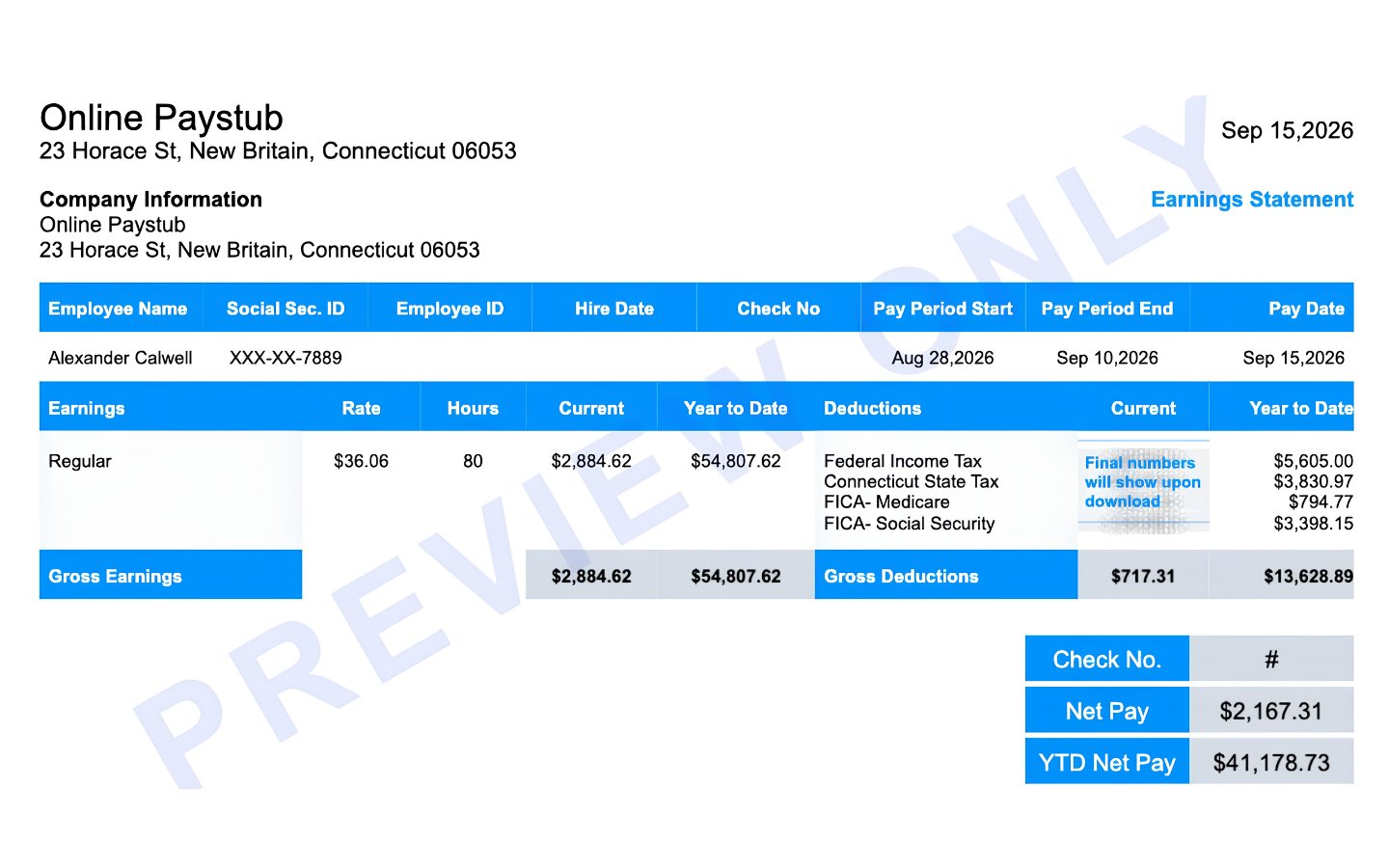
Here is a real preview from the generator for a Connecticut employee. It is the statement shown on screen before downloading; the final PDF fills in every current deduction.
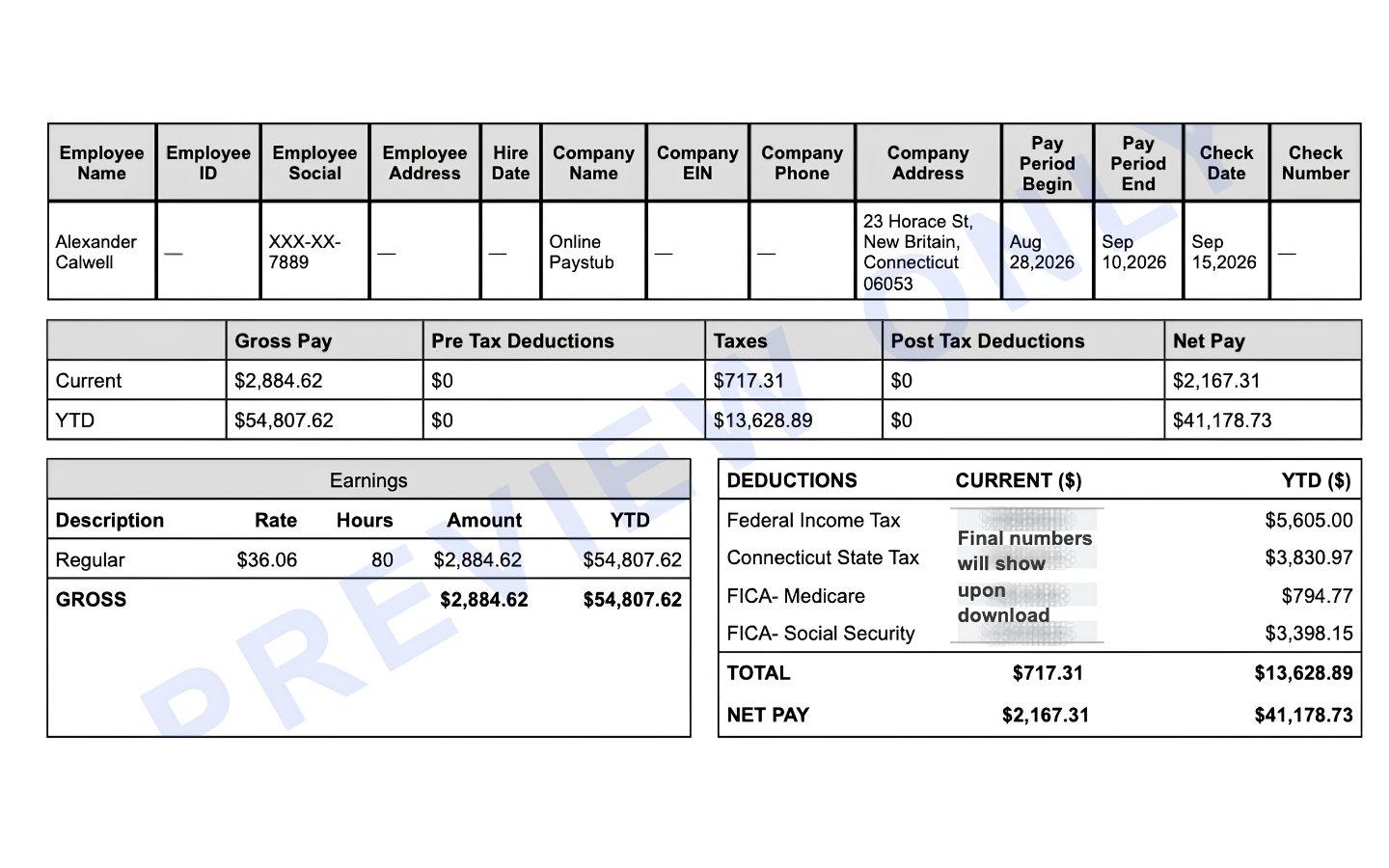
Scenario: Alexander Calwell, salaried employee of a company in New Britain, Connecticut, paid biweekly under DOL approval. Pay period Aug 28 to Sep 10, 2026, check date Sep 15, 2026. Annual salary $75,000, shown as $36.06 per hour over 80 hours. Nineteenth paycheck of the year.
| Line | Rate | Hours | Current | Year to Date |
|---|---|---|---|---|
| Regular | $36.06 | 80 | $2,884.62 | $54,807.62 |
| Gross pay | $2,884.62 | $54,807.62 | ||
| Federal income tax | per W-4 | $295.00 | $5,605.00 | |
| Connecticut state tax | CT-W4 tables | $201.63 | $3,830.97 | |
| FICA - Medicare | 1.45% | $41.83 | $794.77 | |
| FICA - Social Security | 6.20% | $178.85 | $3,398.15 | |
| CT Paid Leave (CTPL) | 0.50% | $14.42 | $273.98 | |
| Total deductions | $731.73 | $13,902.87 | ||
| Net pay | $2,152.89 | $40,904.75 |
Reading the statement:
- Header row. This template carries the full identification set in one strip: employee name, masked Social Security number, employer name and New Britain address, pay period begin and end, check date and blank fields for employee ID, hire date, EIN, phone and check number. Blank optional fields are acceptable; the statute cares about hours, earnings, deductions and net.
- Summary strip. Gross, pre-tax deductions, taxes, post-tax deductions and net pay for the current period and year to date. Pre-tax and post-tax deductions read $0 because this employee has no benefit elections; a 401(k) contribution would land in pre-tax, a Roth or garnishment in post-tax.
- Earnings. One line: $36.06 x 80 hours = $2,884.62, which is $75,000 divided by 26 pay periods. A salaried exempt employee can be shown either as salary or as an hourly equivalent; both are compliant because no overtime is owed.
- Connecticut state tax $201.63. The state line is produced from the CT-W4 code entered for the employee. On this preview it equals 6.99 percent of gross, the top marginal rate, which is what the generator applies when no withholding code has been selected. Enter the employee's actual code (F for a single filer, C or D for married filers, and so on) and the line drops to the graduated table amount for a $75,000 salary.
- FICA lines are exact. $2,884.62 x 1.45% = $41.83 and x 6.2% = $178.85; each YTD figure equals the current amount times 19.
- CT Paid Leave $14.42. One half of one percent of gross. Its YTD of $273.98 will keep growing until wages pass the Social Security wage base, which this employee will not reach in the year. Every Connecticut employee stub needs this row.
- The totals close. $2,884.62 minus $731.73 equals $2,152.89. Net pay on a stub that does not reconcile to its own lines is the first thing a lender rejects.
To reproduce this stub, select Connecticut as the work state, choose the biweekly period, enter the rate and hours, set the CT-W4 code and confirm the CT Paid Leave line.
Reading Your CT-W4 Withholding Code on the Pay Stub
Form CT-W4 does not use allowances. The employee chooses a letter code that selects the withholding table:
- A Married filing separately
- B Head of household
- C Married filing jointly, one spouse working
- D Married filing jointly, both working, or the higher-income spouse
- E No withholding required (employee expects no Connecticut tax liability)
- F Single
Code E must be justified and the employer may have to file the form with DRS. A new hire who has not returned a CT-W4 is withheld at the highest table. Employees can also request an additional flat amount or a reduced amount on the form. The state tax line on the stub is the direct output of this choice, so an unexpected figure usually traces back to the code on file.
Connecticut Minimum Wage 2026: $16.94 and Annual Indexing
Connecticut's minimum wage is $16.94 per hour as of January 1, 2026. Since 2024 it has been indexed to the federal Employment Cost Index and adjusts every January, so the figure on a stub for a non-exempt hourly worker should be checked against the current year's rate rather than last year's.
Tipped Wage for Servers and Bartenders
Employers may pay hotel and restaurant servers $6.38 per hour and bartenders $8.23 per hour, with tips making up the difference to $16.94. The stub should show the cash wage, reported tips and total so the tip credit can be verified for the pay period.
Overtime After 40 Hours Under Connecticut Law
Connecticut's own wage law, not just the federal FLSA, requires one and a half times the regular rate for hours over 40 in a workweek. There is no daily overtime. Because § 31-13a requires overtime on its own line, an hourly stub for a 44-hour week shows 40 regular hours and 4 overtime hours as two entries. Connecticut also requires a 30-minute meal break for shifts of seven and a half hours or more, which does not appear on the stub but affects the hours entered.
Connecticut Paid Sick Leave on the Pay Stub (2026 Expansion)
Connecticut's paid sick leave law now reaches employers with 11 or more employees (down from 25 in 2025) and will cover employers with a single employee from 2027. Employees accrue one hour for every 30 hours worked, up to 40 hours a year. The statute does not require the balance to be printed on the wage statement, but many employers include an accrued and used line, and employees increasingly expect to see it next to their paid leave deduction. The generator's detailed template has space for it.
Who Uses a Connecticut Paystub Generator?
Employees in Hartford, Stamford, New Haven and Bridgeport Needing Proof of Income
Rents in Fairfield County and around New Haven are among the highest in New England, and leasing offices ask for two or three recent stubs before releasing a unit. Auto lenders, mortgage underwriters and the CT Paid Leave Authority itself, when an employee files a claim, all want the same documentation. If your employer pays by direct deposit without a printed statement or a stub was lost, rebuild it from your payroll portal or W-2 figures so it matches what your employer reports.
Small Employers Running Weekly Payroll Without Software
A weekly payday means 52 stubs a year per employee. A Waterbury contractor, a Norwalk café or a Danbury landscaping crew running payroll from a spreadsheet can produce a compliant statement each week without a payroll subscription, including the CT Paid Leave line that spreadsheets tend to forget.
Contractors and Self-Employed Workers
Independent contractors receive payments without withholding and no CT Paid Leave deduction (self-employed individuals may enroll voluntarily, but that is not a payroll deduction). The contractor option produces a payment statement with earnings and YTD totals and no tax lines, which is the correct record of 1099 income.
Create Your Connecticut Pay Stub in Three Steps
- Enter employer and employee details, select Connecticut and set the pay frequency (weekly, or biweekly if your employer holds DOL approval).
- Add rate, hours and any overtime or tips on separate lines, set the federal W-4 status and the CT-W4 code.
- Review the free preview, confirm the CT Paid Leave line is present and download the PDF.
Responsible Use of Pay Stubs
A pay stub records wages actually earned and paid. Use the generator to document real payroll, replace a lost statement with matching figures or issue the wage statement Connecticut law requires. Do not fabricate employment, inflate income for a rental or loan or alter figures after the fact. Lenders verify stubs against bank deposits and employer records, and falsified income documents carry criminal exposure under Connecticut and federal law. You are responsible for every figure entered.
Nearby State Pay Stub Resources
Create a pay stub for a nearby state or one of our most popular states.


Connecticut Paystub Generator FAQ
Does Connecticut require pay stubs?
Yes. Under § 31-13a employers must give a record of hours worked, gross earnings (with straight time and overtime separate), itemized deductions and net earnings with every wage payment, on paper or electronically with consent.
What is the CT Paid Leave deduction on my pay stub?
It is the employee contribution to the Connecticut Paid Leave program: 0.5 percent of wages, withheld each paycheck until your wages for the year pass the Social Security wage base. Employers do not contribute. It funds paid family and medical leave benefits you can claim through the CT Paid Leave Authority.
What is the Connecticut income tax rate on a paycheck in 2026?
Connecticut uses graduated brackets from 2 percent to 6.99 percent. Paycheck withholding follows the table matching your CT-W4 code, so the amount on your stub depends on wages and the code, not on a single flat rate.
What does the withholding code on my CT-W4 mean?
It selects the withholding table: A married filing separately, B head of household, C married joint with one income, D married joint with two incomes, E no withholding, F single. Changing the code changes the Connecticut state tax line.
Does Connecticut require weekly pay?
Yes, by default. Employers may pay biweekly or less often only with written approval from the Connecticut Department of Labor. Wages are due within eight days of the end of the pay period.
What is Connecticut minimum wage in 2026?
$16.94 per hour, adjusted each January based on the Employment Cost Index. Tipped servers may be paid $6.38 and bartenders $8.23 in cash wages, with tips covering the rest.
Can I create a CT pay stub online for proof of income?
Yes. Enter real pay data, your W-4 status and CT-W4 code, select Connecticut and download the statement for rental, loan or benefits applications. Lenders verify the figures against employer records.
Can contractors use a Connecticut paystub generator?
Yes, with the contractor option. The output is a payment statement without withholding or a CT Paid Leave deduction, which correctly represents contractor income.