
Independent contractors get paid, but rarely the way employees do. There is no payroll department, no automatic withholding and no tidy stub landing in an inbox every other Friday. Instead there are invoices, platform payouts, deposits and a Form 1099-NEC at the end of the year. That works for the IRS, but it does not help much when a landlord, a lender or a consulate asks what you earn month to month.
That gap is why freelancers, 1099 contractors and gig workers end up looking for a way to produce a pay stub of their own. A contractor pay stub is not payroll. It is an itemized record of a payment that already happened: who paid you, for what work, over what period, how much was billed, what was deducted and what actually landed in your account.
This guide covers what a self-employed pay stub is and what it is not, the fields to include, a worked example, a step-by-step process for building one, how to keep the numbers consistent with the 1099-NEC your client files, how long to keep records and where the legal line sits.
Why a Contractor Needs Pay Stubs as Proof of Income
Nearly every request comes from the same place: someone outside your business needs to judge whether your income is real, recent and repeatable. A 1099-NEC shows one annual total, arrives months late and says nothing about whether you are still earning today. Common situations include:
- Renting an apartment, where a property manager wants two or three months of recent income documentation and usually compares your gross monthly income with the rent.
- Auto loans and dealer financing, where an underwriter needs current cash flow to set a payment.
- Mortgage applications, where self-employed borrowers supply tax returns plus supporting records such as 1099s, invoices and stubs.
- Personal loans and credit lines, where the lender wants proof the stated income exists.
- Visa, immigration and travel applications that require evidence of financial support.
- Child support or family court filings, where income must be documented rather than described.
- Your own bookkeeping, so monthly earnings by client are visible without rebuilding them from bank statements.
Remember that a stub is one part of a package, not the whole package. Self-employed applicants are usually asked for stubs plus bank statements, invoices and tax returns, because a stub alone is a document you produced.
A Payment Record, Not Evidence of Employment
This is the part that gets people into trouble. A contractor pay stub documents a business-to-business payment. It does not make you an employee of the client and must never be presented as if it does. If a form asks for your employer, the honest answer is that you are self-employed, with the client listed as a payer or customer.
Your client withholds nothing
A business paying an independent contractor generally does not withhold federal income tax, Social Security or Medicare, and pays no employer share on your behalf. There is no W-4, no FICA line and normally no state withholding. The main exception is backup withholding at 24%, which applies when a payee fails to furnish a correct taxpayer identification number or the IRS tells the payer to withhold. A contractor stub showing ordinary tax withholding is a red flag to any underwriter who reads it, because those lines belong on an employee stub.
You handle self-employment tax and quarterly estimates
Because nothing is withheld, contractors pay their own taxes. Once your net earnings from self-employment reach $400 for the year, you owe self-employment tax of 15.3%: 12.4% for Social Security, which applies only up to the annual wage base ($184,500 for 2026), and 2.9% for Medicare. You report business income and expenses on Schedule C, figure the tax on Schedule SE and can deduct the employer-equivalent half of it when computing adjusted gross income.
If you expect to owe $1,000 or more when you file, the IRS generally expects estimated tax payments during the year, made with Form 1040-ES in four installments due April 15, June 15, September 15 and January 15 of the following year. A pay stub changes none of this: it records cash, not tax liability. If your situation is complicated, talk to a CPA or enrolled agent.
1099 Pay Stub vs. Employee W-2 Stub
An employee's year ends with a Form W-2 that reports wages and the taxes already withheld from them. A contractor's year ends with a 1099-NEC that reports only what was paid, and the stubs differ in the same way.
| Line item | Employee W-2 stub | Independent contractor stub |
|---|---|---|
| Relationship | Employer and employee | Client or payer and self-employed business |
| Year-end form | Form W-2 | Form 1099-NEC, when the client pays you $2,000 or more in the year (for payments made after 2025) |
| Federal income tax withheld | Yes, based on Form W-4 | No, unless backup withholding applies |
| Social Security and Medicare | Withheld, with an employer match | Not withheld; paid by the contractor as self-employment tax |
| State and local income tax | Usually withheld | Not withheld; the contractor handles it |
| Gross pay basis | Hourly rate or salary set by the employer | Agreed rate, milestone or flat project fee |
| Typical deductions | Taxes, insurance, retirement, garnishments | Only agreed business items such as materials, platform fees or advances |
| Benefits and overtime | May include PTO, benefits and an overtime premium | Generally none; terms come from the contract |
| What it proves | Employment and wages | That a specific payment for services was made |
What a Contractor Pay Stub Should Contain
Use this as your field checklist. Anything a reviewer needs to match the payment to an invoice or a deposit belongs on the document.
| Field | Why it matters |
|---|---|
| Contractor legal name and address | Identifies the payee and should match your Form W-9 |
| Business name and EIN, if used | Matches the entity the client reports on the 1099-NEC |
| Client or payer name and address | Shows who paid and who can verify it |
| Invoice number or contract reference | Ties the stub to the underlying paperwork |
| Pay period or service dates | The window of work covered, for example July 1 to July 31 |
| Payment date | The date funds were actually issued or received |
| Description of services | Plain wording such as web development, delivery shifts or drywall installation |
| Rate and quantity, or flat fee | For example $75.00 per hour times 32 hours, or a $2,400.00 project fee |
| Gross amount | Total billed for the period before any agreed deductions |
| Agreed deductions | Materials, platform fees, equipment rental, advances or approved retainage |
| Net amount paid | Gross minus deductions; must equal the deposit |
| Year-to-date totals | Running gross, deductions and net for the calendar year with that client |
| Payment method and reference | ACH, check number, wire or platform payout ID |
| Status label | A note that this is a contractor payment record, not employee wages |
Most of these fields sit where they would on an employee stub, so if you know what a standard pay stub looks like, the layout will feel familiar. The real difference is what is missing: there is no withholding block. Leave the federal, FICA and state tax lines off entirely, or show them as $0.00 with a short note that no taxes are withheld from contractor payments.
Contractor Pay Stub Example
Here is a filled-in 1099 pay stub sample. Jordan Ellis, a freelance web developer, bills Northwind Digital LLC weekly at $75 an hour. Northwind pays through a freelance marketplace that keeps a 5% platform fee before the payout reaches Jordan's bank account. The week of September 7 to 13, 2026 was Jordan's ninth paid week on the contract.
| Line | Current period | Year-to-date |
|---|---|---|
| Web development, 32 hours at $75.00 | $2,400.00 | $21,600.00 |
| Platform fee (5%) | −$120.00 | −$1,080.00 |
| Net amount paid | $2,280.00 | $20,520.00 |
| Federal, Social Security, Medicare and state tax withheld | $0.00 | $0.00 |
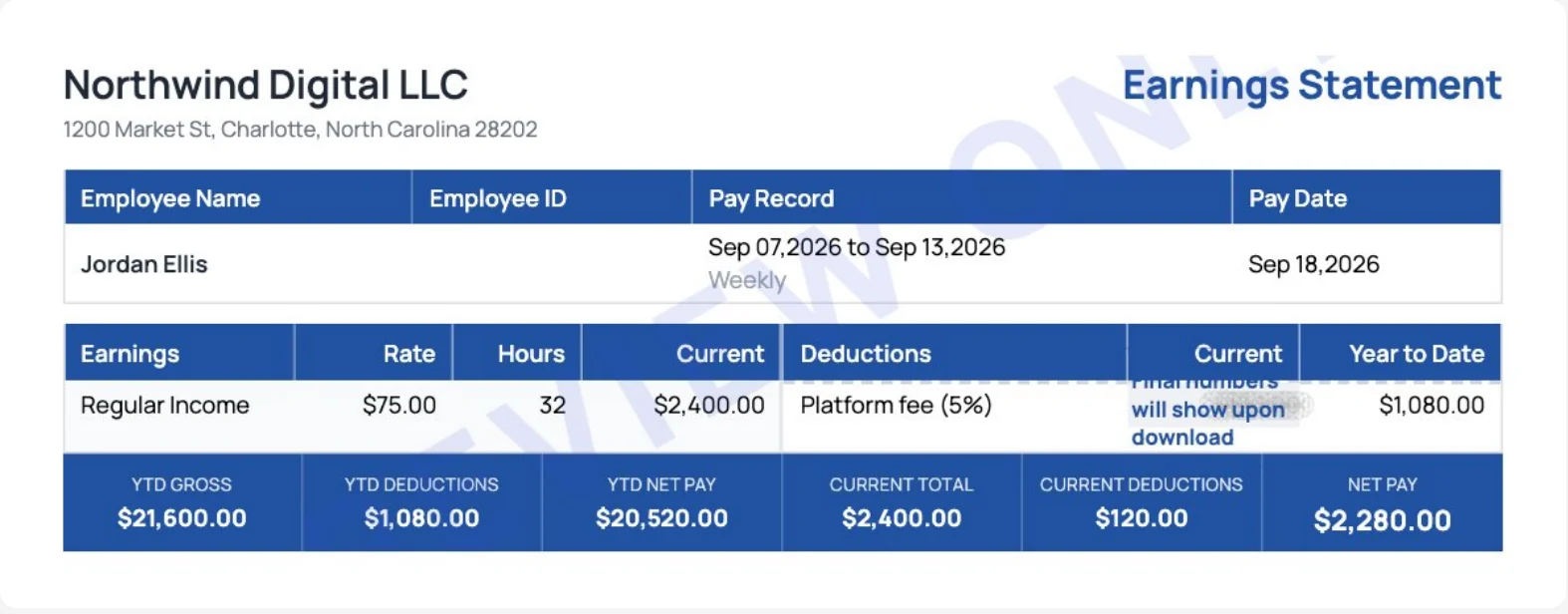
Every number traces back to a source: the hours to the invoice, the fee to the marketplace statement and the $2,280.00 net to the bank deposit. The year-to-date column is simply nine weekly payments added together, which is exactly how the client's 1099-NEC total will be built at the end of the year.
How to Create a 1099 Pay Stub, Step by Step
Step 1: Gather the source documents
Pull the invoice or contract for the period, the bank or platform record of the deposit and any note about fees netted out. Every number on the stub must trace back to one of these. If you cannot point to a source, do not put the figure on the document.
Step 2: Define the period and the parties
Decide whether the stub covers a month, a two-week cycle, one invoice or one milestone, and stay consistent so periods do not gap or overlap. Then enter your legal name and address exactly as they appear on the Form W-9 you gave the client, the client's name and address, and the invoice or contract number.
Step 3: Lay out the earnings
Enter the description of services and either the rate and quantity or the flat fee, and show the math. A line reading 40 hours at $65.00 equals $2,600.00 is far more credible than a bare total and lets a reviewer check it in seconds.
Step 4: Apply only real, agreed deductions
If the client withheld a marketplace commission, a materials charge, an equipment fee or an advance repayment, list each separately with a label. Never invent a deduction to make a number come out even, and never label anything a tax withholding when it is not one.
Step 5: Calculate net pay and year-to-date totals
Net equals gross minus deductions and has to match the deposit. Then update your year-to-date totals so gross, deductions and net accumulate correctly from stub to stub. Totals that do not add up are the fastest way to lose a reviewer's trust.
Step 6: Generate, save and review
Build the document in a spreadsheet template, in invoicing software or with an online pay stub generator that formats the fields and handles the year-to-date math. Employee stubs are a different job, because withholding has to be calculated on every line, and that process has its own step-by-step paystub guide; everything here applies only to 1099 income. Save a PDF, name it by client and period, and store the invoice and bank record alongside it. Before sending, confirm three things: net matches the deposit, dates match the invoice and no withholding is shown.
How to Make a Contractor Pay Stub in Online Paystub
The Online Paystub generator has a contractor mode that handles the withholding question for you. This is how the example above was built:
- Enter the client as the company. In Company Information, add the client's name and address, since the client is the payer.
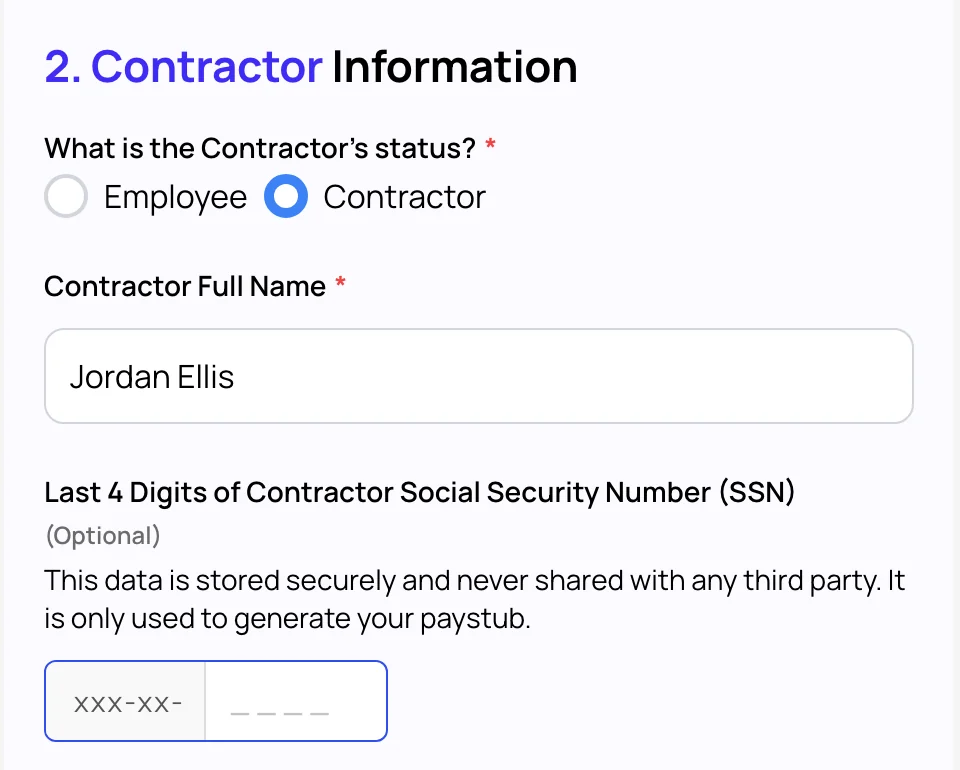
- Choose Contractor. Under "What is the Contractor's status?", select Contractor and enter your full name. The generator then drops the federal income tax, Social Security, Medicare and state tax lines from the stub.
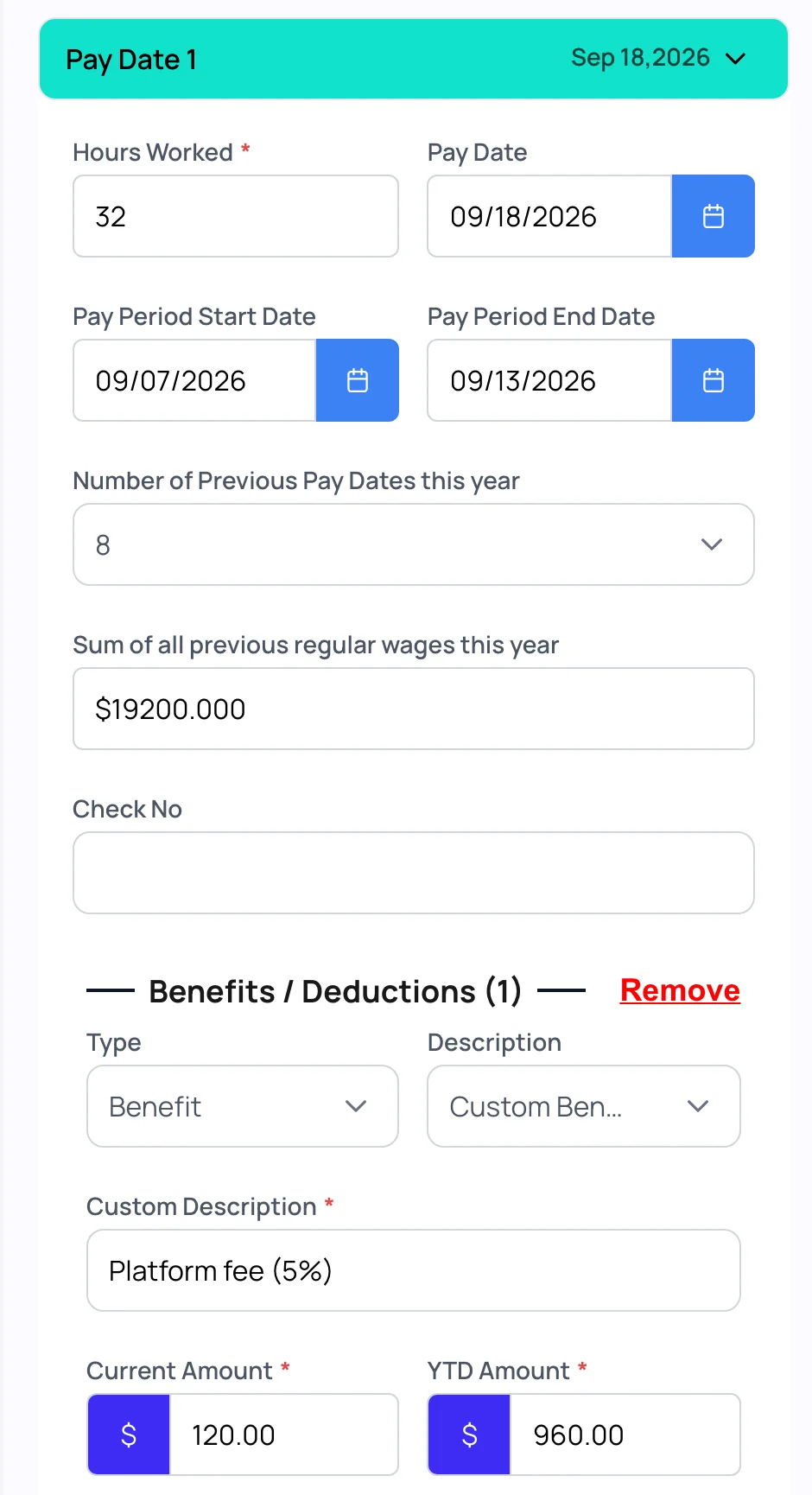
- Set the pay basis. In Salary Information, choose Hourly or Salary, the payment frequency and your rate. Open the pay date to enter hours, the pay date and the service period.
- Carry your year-to-date figures. Enter the number of earlier payments this year and the sum of those earlier payments, so the year-to-date column starts from the right place.
- Add agreed deductions. Select + Add Additions and/or Deductions, set the type to Benefit and the description to Custom Benefit/Deduction, then name it, for example "Platform fee (5%)". Enter the current amount and, in the YTD field, the fees from earlier payments this year; the stub adds the current fee to that total.
- Check the preview. Confirm that net pay equals your deposit and that no tax lines appear, then pick a template and download the PDF.
The generator has no separate field for a status note, so if a reviewer needs it spelled out, send the stub with the invoice and a one-line note that it is a contractor payment record, not employee wages.
Keeping Stubs Consistent With the 1099-NEC
Clients report nonemployee compensation on Form 1099-NEC, usually sending a copy in late January. For payments made after 2025, a client files one when it pays you $2,000 or more during the year, up from $600, and the threshold may be adjusted for inflation from 2027, according to the IRS instructions for Forms 1099-MISC and 1099-NEC. The 1099-NEC is one of several 1099 forms a contractor may receive, and it is cash basis: it reports what was actually paid during the year, not what you invoiced. Your stubs should follow the same logic.
- Date each stub by payment date, not invoice date. A December invoice paid in January belongs to January and to the following year's 1099.
- Report gross, not net. If a platform fee was netted out, show gross and list the fee as a deduction.
- Keep one running year-to-date total per client so your December total can be compared directly to that client's 1099.
- Payments you receive through payment apps and online marketplaces are reported on Form 1099-K instead, and only when they exceed $20,000 in more than 200 transactions in the year. Income is taxable whether or not any form arrives, so keep stubs for those payments too.
- If a 1099-NEC disagrees with your records, ask the client for a corrected form rather than adjusting your own documents.
If You Are the Business Paying Contractors
Companies can issue payment stubs to contractors as a courtesy, but the paperwork must stay consistent with contractor status. Collect a Form W-9 before the first payment, keep a signed contract describing scope and independence, and issue remittance advice rather than a payroll stub. Do not run contractors through payroll, do not show tax withholding and do not call payments wages or salary.
Classification depends on the actual working relationship, not on the paperwork. The IRS weighs behavioral control, financial control and the type of relationship in its guidance on whether a worker is an independent contractor or an employee, and the Department of Labor explains how misclassification affects minimum wage and overtime rights. Several states apply stricter tests, and anyone you treat as an employee is covered by paystub rules by state as well. Misclassification can mean back taxes, penalties and wage claims.
How Long to Keep Your Stubs
Contractor stubs are business records. The IRS page on how long to keep records ties the answer to the period of limitations: generally three years from filing, six years if you underreport income by more than 25% and indefinitely if no return was filed. A workable habit for a solo contractor:
- Keep at least seven years of stubs, invoices and bank statements, foldered by year and client.
- Keep tax returns themselves indefinitely; they are small files and they settle most disputes.
- Store PDFs in two places, such as a cloud drive plus a local backup.
- Keep the last twelve months easy to reach, since that is what landlords and lenders ask for most.
- Check your state's rules, as some expect longer retention for certain business records.
A Clear Warning About Falsified Income Documents
Creating a stub for income you actually earned is ordinary bookkeeping. Creating one for income you did not earn, or inflating real numbers to qualify for something, is fraud. Submitting a fabricated stub to a lender, landlord, government agency or immigration authority can lead to civil liability and criminal charges, and it voids whatever agreement you obtained.
Verification is routine. Lenders pull tax transcripts from the IRS, cross-reference deposits and call the payer named on the document. Every stub you produce must reflect a payment that actually happened, in the amount it happened, on the date it happened. If your income is genuinely too low or too irregular for an application, address that with a cosigner, a larger deposit or a different lender, not by changing the paperwork.
Paid as a 1099 contractor? Turn your invoices and deposits into a clean contractor pay stub in minutes.
Create a 1099 Contractor Pay Stub