Kansas Paystub Generator
Kansas taxes wages in just two brackets, 5.2% and 5.58% and a revenue trigger that could have cut them again for 2026 did not fire. Kansas is also one of the few states with no general pay stub law: employers only have to itemize deductions when an employee asks. That makes a clear stub your own best record. This generator builds a Kansas statement with K-4 withholding, FICA and current and year-to-date totals that a Wichita lender or an Overland Park landlord can follow at a glance.
 Create Your Kansas Paystub
Free preview · Kansas K-4 withholding and FICA itemized · Instant PDF
Why Kansas Employers and Workers Use Online Paystub
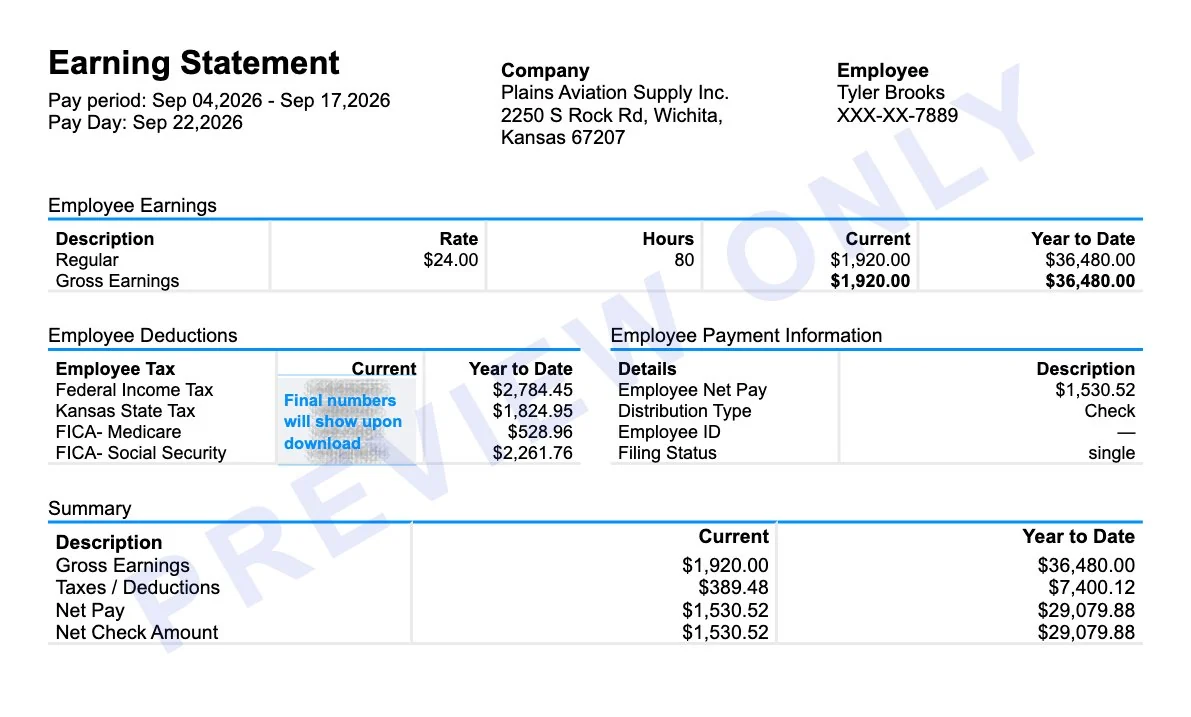
Kansas withholding runs on Form K-4 allowances and the KW-100 tables. A single employee with no allowances pays 5.2% on annualized wages above $3,605 and 5.58% above $26,605. There are no city or county wage taxes in Kansas, so a correct stub has exactly two tax lines beyond FICA: federal and Kansas. Aircraft suppliers in Wichita, grain elevators in Dodge City and tech firms in Johnson County all need those lines laid out cleanly.
Online Paystub prepares the statement at weekly, biweekly, semimonthly or monthly frequency. Preview it free, fix anything that is off and download the PDF as a payroll record or proof of income.
Kansas Pay Stub Video Guide: How to Make Yours Online
Follow the walkthrough, choose Kansas as the work state and enter the K-4 details so the Kansas withholding line is calculated for you.
What Is a Kansas Paystub?
A Kansas paystub is the record that travels with each paycheck and shows how gross wages turned into the amount that reached the bank. Everything that makes a paystub useful anywhere in the country applies here: the pay period, hours and rate, each tax and deduction, net pay and the running year-to-date totals that let a full year reconcile to a W-2.
What makes a Kansas check stub its own thing is how short the tax column is. There are two income tax lines at most, federal and Kansas, because no Kansas city or county taxes wages. The Kansas figure comes from Form K-4 rather than the federal W-4, so two people earning identical pay can see different state amounts purely because of the allowances they claimed.
What Does a Kansas Paystub Look Like?
A Kansas payroll stub is usually one page split into three bands. Across the top sit the employer and employee details with the pay period and pay date. The middle holds earnings on the left and deductions on the right, each with a current column beside a year-to-date column. The bottom shows gross pay, total deductions and net pay, sometimes next to a check number.
- Earnings: regular hours and rate, plus overtime, bonuses or commission on their own lines.
- Taxes: federal income tax, Social Security at 6.2%, Medicare at 1.45% and Kansas income tax.
- Other deductions: health insurance, a 401(k) or garnishments, each named rather than lumped together.
- Totals: gross pay, gross deductions and net pay, with year-to-date figures beside them.
The block-by-block tour in our walkthrough of what pay stub look likes covers shows where each of these sits on a printed page. Further down this page there is a real Kansas example with the state tax line highlighted.
Show Proof of Income in Kansas With Online Paystub
Most requests for a Kansas stub come from someone who needs proof of income: a Wichita apartment manager asking for the last two stubs, a credit union underwriting a car loan or a benefits office confirming household earnings. What those reviewers check is whether the numbers hold together, so the stub puts gross pay, each deduction, net pay and the year-to-date totals where they are read first.
- Free preview before paying. The finished stub appears on screen, so a wrong rate or address is fixed before checkout.
- One flat price. $4.99 a stub, no subscription and no extra charge for Kansas or for contractor pay. A promotion that is running is applied at checkout.
- A refund route. The terms of service allow a refund request within 7 days of purchase when the service did not work as described.
- Consistent year-to-date totals. Earlier pay dates carry forward, so a set of stubs adds up instead of contradicting itself.
- Instant PDF and 24/7 support. The file downloads straight away and questions are answered around the clock.
Use a stub for wages that were genuinely earned and paid, backed by deposits and a W-2. Falsifying income documents is fraud under Kansas and federal law.
Kansas Income Tax Rates for 2026
Kansas has used two brackets since the 2024 special session and they stay the same for 2026. A 2025 law cuts rates automatically when state revenue beats a target, but the Kansas Department of Revenue announced in Notice 25-06 that the trigger was missed, so there is no rate reduction for tax year 2026.
| Filing status | 5.2% bracket | 5.58% bracket |
|---|---|---|
| Single and all other filers | Taxable income up to $23,000 | Over $23,000 ($1,196 plus 5.58% of the excess) |
| Married filing jointly | Taxable income up to $46,000 | Over $46,000 ($2,392 plus 5.58% of the excess) |
Kansas Withholding With Form K-4 and KW-100
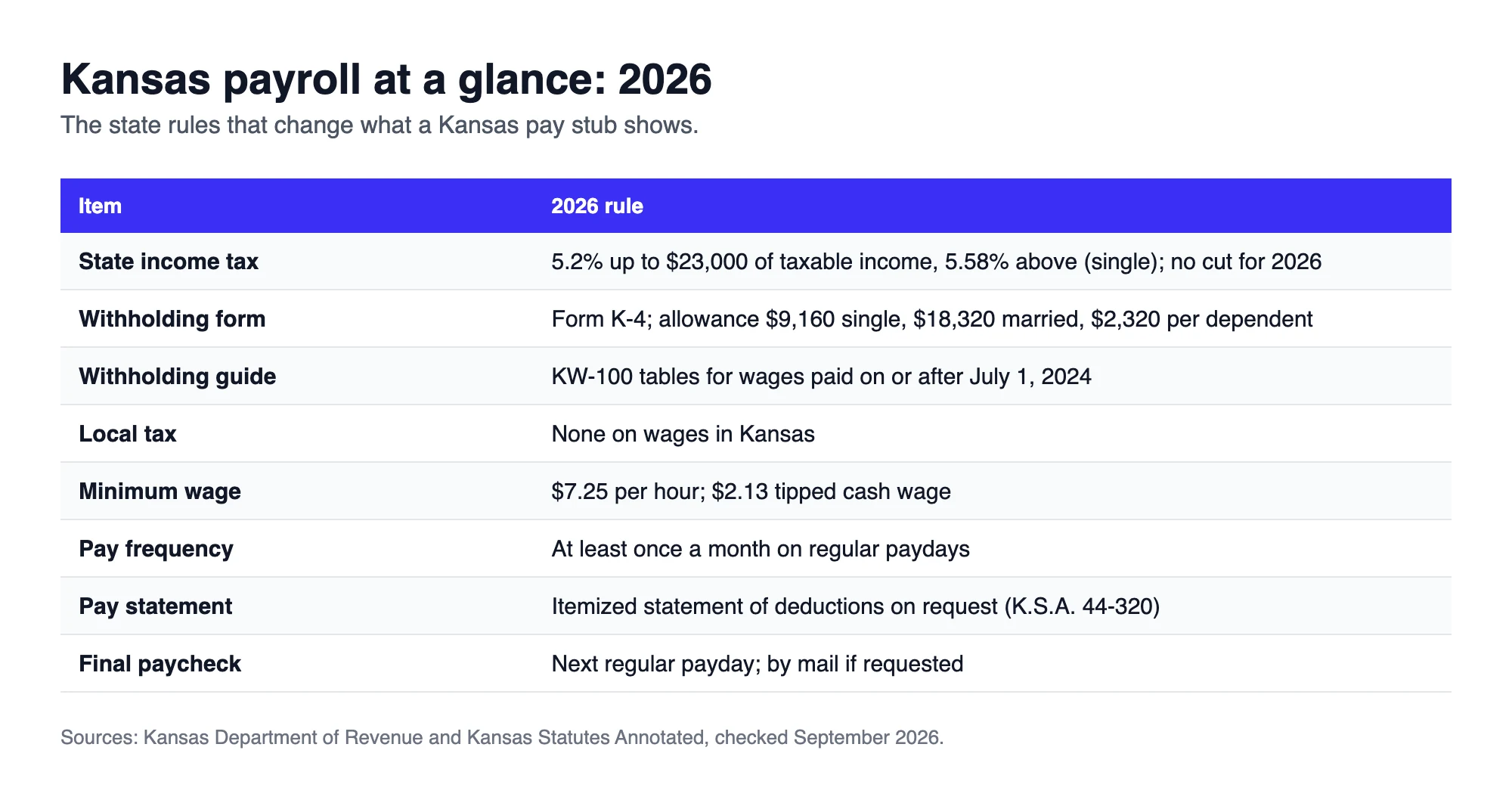
Employees claim Kansas allowances on Form K-4, separate from the federal W-4. The KW-100 guide, still the edition for wages paid on or after July 1, 2024, sets the allowance values:
| Allowance | Annual value | Biweekly value |
|---|---|---|
| Single, head of household or married filing separately | $9,160 | $352.31 |
| Married filing jointly | $18,320 | $704.62 |
| Each dependent | $2,320 | $89.23 |
After the allowances are subtracted, the annual table withholds nothing on the first $3,605 for single filers ($8,240 for married filers), 5.2% on the next band and 5.58% above $26,605 ($54,240 married). For a $1,920 biweekly check with no K-4 on file: ($49,920 − $26,605) × 5.58% + $1,196 = $2,496.98 a year or about $96.04 a check. The full tables are in the KW-100 withholding guide.
No Local Wage Tax in Kansas
Kansas law does not let cities levy an income tax on wages, so Kansas stubs should never show a city or county tax line. Workers who cross the state line are a different story: Kansas residents who work in Kansas City, Missouri owe Missouri tax on those wages and the Kansas City, Missouri earnings tax, which are reported on a Missouri stub rather than a Kansas one.
What Kansas Law Requires on a Pay Statement
Kansas has no statute listing what every pay stub must show. Under K.S.A. 44-320, an employer must, on request:
- Give the employee an itemized statement of the deductions taken from wages for each pay period
- Provide written notice of the rate of pay and the day and place of payment
- Give advance notice of changes to pay, vacation, sick leave or benefit policies
Because lenders, landlords and agencies still expect a full statement, most Kansas employers issue stubs with gross pay, hours, each deduction, net pay and year-to-date totals anyway. The labels on those lines are explained in the standard list of pay stub abbreviations.
Sample Kansas Paystub Generator Output
Here is a preview from the generator for a Wichita employee paid biweekly. The Kansas tax line and the net pay are highlighted.
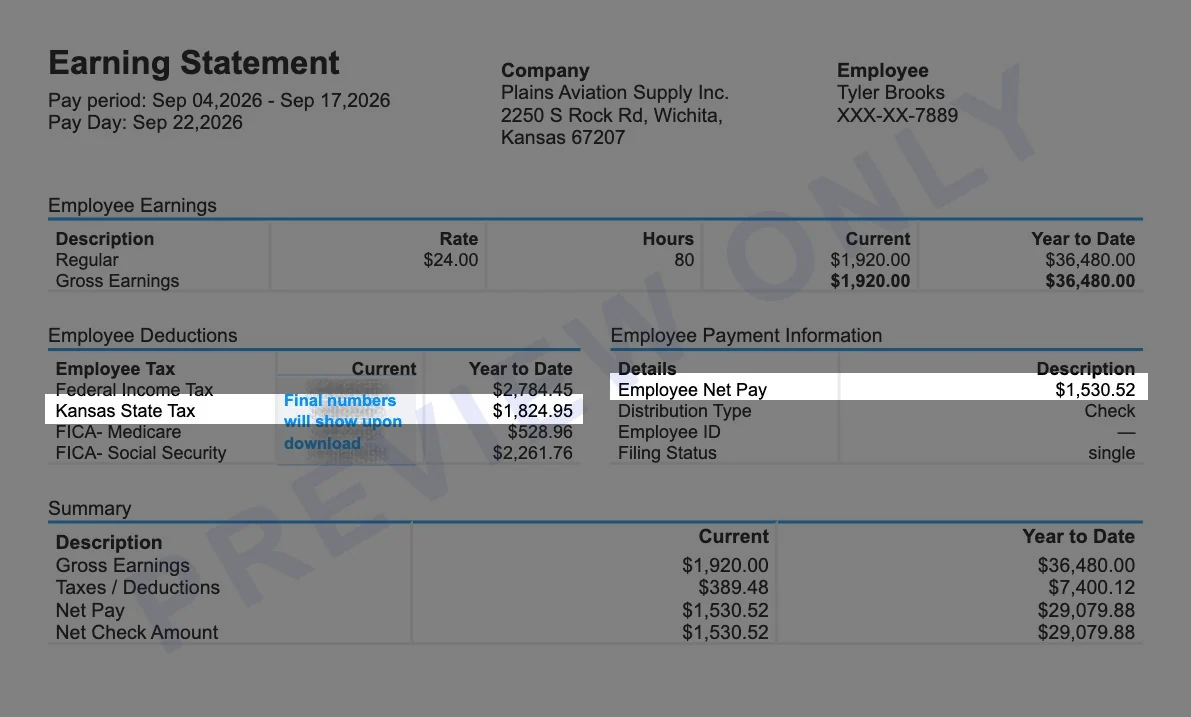
Scenario: hourly employee of an aviation supply company at 2250 S Rock Rd, Wichita, KS 67207, paid biweekly. Pay period Sep 4 to Sep 17, 2026, pay date Sep 22, 2026. $24.00 an hour for 80 hours, no K-4 allowances. This is the 19th paycheck of the year.
| Line | Current | Year to date |
|---|---|---|
| Regular pay (80 hours at $24.00) | $1,920.00 | $36,480.00 |
| Federal income tax | $146.55 | $2,784.45 |
| Kansas state tax | $96.05 | $1,824.95 |
| Medicare (1.45%) | $27.84 | $528.96 |
| Social Security (6.2%) | $119.04 | $2,261.76 |
| Net pay | $1,530.52 | $29,079.88 |
With one single allowance on the K-4, the Kansas line would drop to about $76 a check, which is why the K-4 matters as much as the rate.
Kansas Minimum Wage 2026: $7.25 and the $2.13 Tipped Wage
| Wage rule | 2026 amount |
|---|---|
| Minimum wage | $7.25 per hour (K.S.A. 44-1203) |
| Tipped employee cash wage | $2.13 per hour, with the employer making up any shortfall to $7.25 |
Employers covered by the federal Fair Labor Standards Act follow the same $7.25 federal minimum.
Paydays and Final Paychecks in Kansas
- Pay frequency: at least once a month on regular paydays designated in advance (K.S.A. 44-314).
- Final pay: whether the employee quits or is let go, wages are due by the next regular payday and the employer mails them if the employee asks (K.S.A. 44-315).
- Year-end forms: Form KW-3 and state W-2 copies are due by January 31 and must be filed electronically.
Nearby State Pay Stub Resources
Create a pay stub for a nearby state or one of our most popular states.


Kansas Paystub Generator FAQ
Does Kansas require employers to provide pay stubs?
Kansas has no general pay stub law. Under K.S.A. 44-320, employers must provide an itemized statement of deductions when an employee asks for one.
What are the Kansas income tax rates in 2026?
5.2% on taxable income up to $23,000 for single filers ($46,000 for joint filers) and 5.58% above that. There was no rate cut for 2026.
How much is a Kansas withholding allowance?
$9,160 a year for single filers, $18,320 for married couples filing jointly and $2,320 for each dependent, under the KW-100 guide.
Are there local income taxes in Kansas?
No. Kansas cities and counties do not tax wages. The Kansas City earnings tax belongs to Kansas City, Missouri.
What is the minimum wage in Kansas in 2026?
$7.25 per hour or $2.13 for tipped employees as long as tips bring them to $7.25.
When is a final paycheck due in Kansas?
By the next regular payday and by mail if the employee requests it.