Maine Paystub Generator
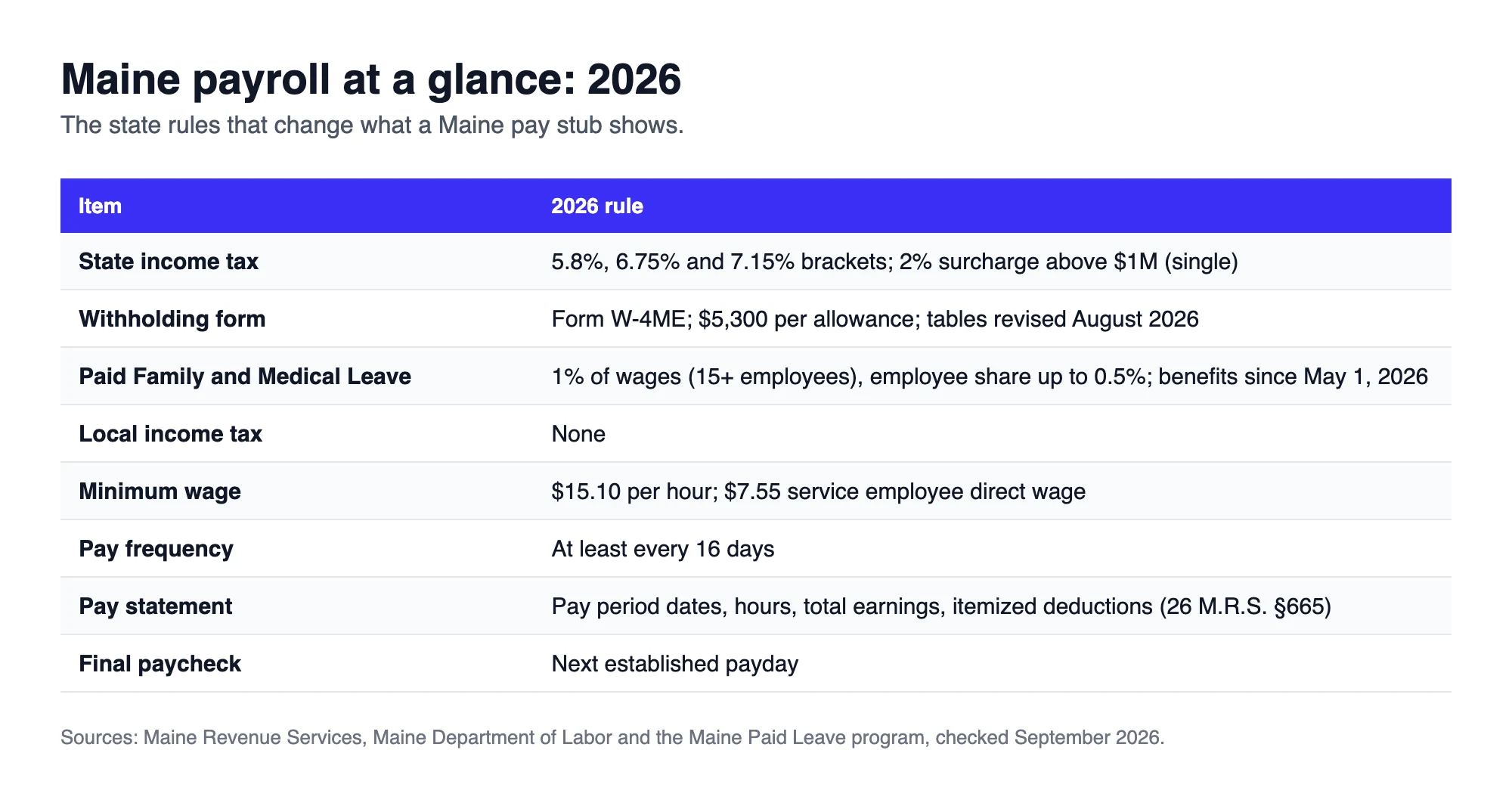
Maine pay stubs changed twice in 2026. Paid Family and Medical Leave benefits became claimable on May 1, so the PFML line that has been on stubs since January 2025 now matters to anyone planning leave. Then in August, Maine Revenue Services revised the withholding tables to raise the standard deduction and add a 2% surcharge on income above $1 million. This generator lays out a Maine statement the way 26 M.R.S. §665 expects: pay period dates, hours, total earnings and every deduction itemized.
 Create Your Maine Paystub
Free preview · Maine tax, PFML and FICA itemized · Instant PDF
Why Maine Employers and Workers Use Online Paystub
Maine taxes wages in three brackets, 5.8%, 6.75% and 7.15% and withholding follows the employee's Form W-4ME rather than the federal W-4. On top of that sits the PFML premium, 1% of wages at employers with 15 or more employees, of which up to half can be deducted from the worker. A Portland marina, a Bangor clinic or a Lewiston contractor all need those lines shown separately with current and year-to-date totals.
Online Paystub builds that statement at weekly, biweekly, semimonthly or monthly frequency. Enter the hours and rate, add the PFML share your employer passes on and preview the stub before you download the PDF for a landlord, a lender or your own payroll file.
How to Make a Maine Pay Stub Online, Step by Step
Watch the generator in action, then repeat the same steps with Maine selected as the work state and your PFML share added as a deduction.
What Is a Maine Paystub?
A Maine paystub is the statement that has to accompany every payment of wages. It is not optional here: 26 M.R.S. §665 requires the pay period dates, the hours worked, total earnings and an itemized list of deductions on each one. What makes a paystub worth keeping beyond that legal minimum is the year-to-date column, because it is what lets twelve months of pay reconcile to a W-2.
A Maine payroll stub also carries a line most of the country never sees. Alongside federal tax, Social Security, Medicare and the state tax withheld through Form W-4ME sits ME PFML, the worker's share of the Paid Family and Medical Leave premium. At employers with 15 or more employees the premium is 1% of wages and up to half of that can be deducted from the employee.
What Should You Check on a Maine Paystub?
Five things are worth a second look on a Maine paycheck stub before it is filed or handed to anyone:
- The state tax line. Maine withholding follows Form W-4ME, not the federal W-4 and each allowance is worth $5,300 a year. If no W-4ME was filed, the employer withholds as single with no allowances, which usually takes too much.
- The PFML deduction. It should be no more than 0.5% of wages and only at employers with 15 or more employees. Smaller employers pay a lower premium and cannot pass on more than their share.
- Hours against the rate. Section 665 requires hours on the statement, so gross pay should equal hours times rate, with overtime paid at one and a half times the regular rate above 40 hours in a week.
- Which tables were used. Maine revised its withholding tables in August 2026 to raise the standard deduction, so a stub from the spring can show a slightly different state amount than an autumn one at identical pay.
- Year-to-date totals. Each figure should be the sum of every check so far this year. A total that jumps or resets is the first thing a lender notices.
If something looks wrong, ask the employer for the calculation behind the line. Maine employers keep payroll records for at least three years, so the detail exists.
What Does a Maine Paystub Look Like?
A Maine check stub is normally one page in three bands. The top carries the employer and employee details with the pay period dates and the pay date. The middle splits earnings on the left from deductions on the right, each with a current column next to a year-to-date column. The bottom totals gross pay, deductions and net pay.
The deduction column on a Maine stub typically runs: federal income tax, Social Security at 6.2%, Medicare at 1.45%, Maine income tax and ME PFML. The layout is walked through block by block in the guide to what a pay stub looks like and further down this page there is a real Maine example with the state tax, the PFML line and net pay highlighted.
What Changed on Maine Pay Stubs in 2026
Four updates affect what a 2026 Maine stub shows:
- New withholding tables in August 2026: Maine Revenue Services raised the standard deduction built into withholding to $12,850 for single filers and $28,550 for married filers, up from $12,450 and $27,750 in the tables published in December 2025.
- A 2% surcharge on very high incomes: from January 1, 2026, Maine taxable income above $1,000,000 for single filers or $1,500,000 for joint filers and heads of household, carries an extra 2%. Withholding now includes it.
- PFML benefits started May 1, 2026: contributions have been deducted since January 2025 and workers can now claim up to 12 weeks of paid leave a year.
- Higher minimum wage: $15.10 an hour, with a $7.55 direct wage for service employees who receive tips.
Maine Income Tax Withholding With Form W-4ME
Maine withholding starts from the employee's Form W-4ME. Since the federal W-4 dropped allowances, Maine allowances are claimed on the W-4ME alone and each one is worth $5,300 a year. The August 2026 method works like this:
- Annualize the wages for the pay period (for example, biweekly wages × 26).
- Subtract $5,300 for each W-4ME allowance.
- Subtract the withholding standard deduction: $12,850 single or $28,550 married, phased out at higher wages.
- Apply the brackets below, add the 2% surcharge if it applies and divide by the number of pay periods.
| Taxable wages (single) | Taxable wages (married) | Rate |
|---|---|---|
| Under $27,400 | Under $54,850 | 5.8% |
| $27,400 to $64,849 | $54,850 to $129,749 | 6.75% on the excess, plus the tax on the lower bracket |
| $64,850 and over | $129,750 and over | 7.15% on the excess, plus the tax on the lower brackets |
Bonuses paid separately can be withheld at a flat 5%. Employers must also withhold Maine tax from nonresidents who work in the state for more than 12 days and earn more than $3,000 there during the year. The current tables are on the Maine Revenue Services employer withholding page.
The Maine PFML Deduction on Your Stub
Maine's Paid Family and Medical Leave program is funded by a premium of 1% of wages at employers with 15 or more employees. The employer may deduct up to half of that, 0.5%, from the employee. Employers with fewer than 15 employees pay a 0.5% rate and may deduct all of it. Wages above $184,500, the 2026 Social Security wage base, are not subject to the premium.
- The premium is calculated on wages before taxes, but it does not reduce the wages that federal or Maine income tax is figured on.
- The employee share appears on the W-2 in Box 14, labeled MEPFML.
- Program rules and benefit claims are handled by the state Maine Paid Leave program.
On a biweekly check of $1,840, the 0.5% employee share is $9.20. Over a full year of 26 checks at that pay it adds up to $239.20.
What Maine Law Requires on Every Pay Statement (26 M.R.S. §665)
With every payment of wages, a Maine employer must provide a statement that clearly shows:
- The date of the pay period
- The hours worked
- Total earnings
- Itemized deductions
The same details are due when wages go by direct deposit. Electronic stubs are allowed as long as the employee has ready access and can print them at no cost. Employers must keep payroll records for at least three years. Each deduction line is written in payroll shorthand and the standard pay stub abbreviations explain labels such as FIT, SWT and OASDI.
Sample Maine Paystub Generator Output
Here is a preview from the generator for a Portland employee paid biweekly. The highlighted lines are the ones specific to Maine: state income tax, the PFML share and the resulting net pay.
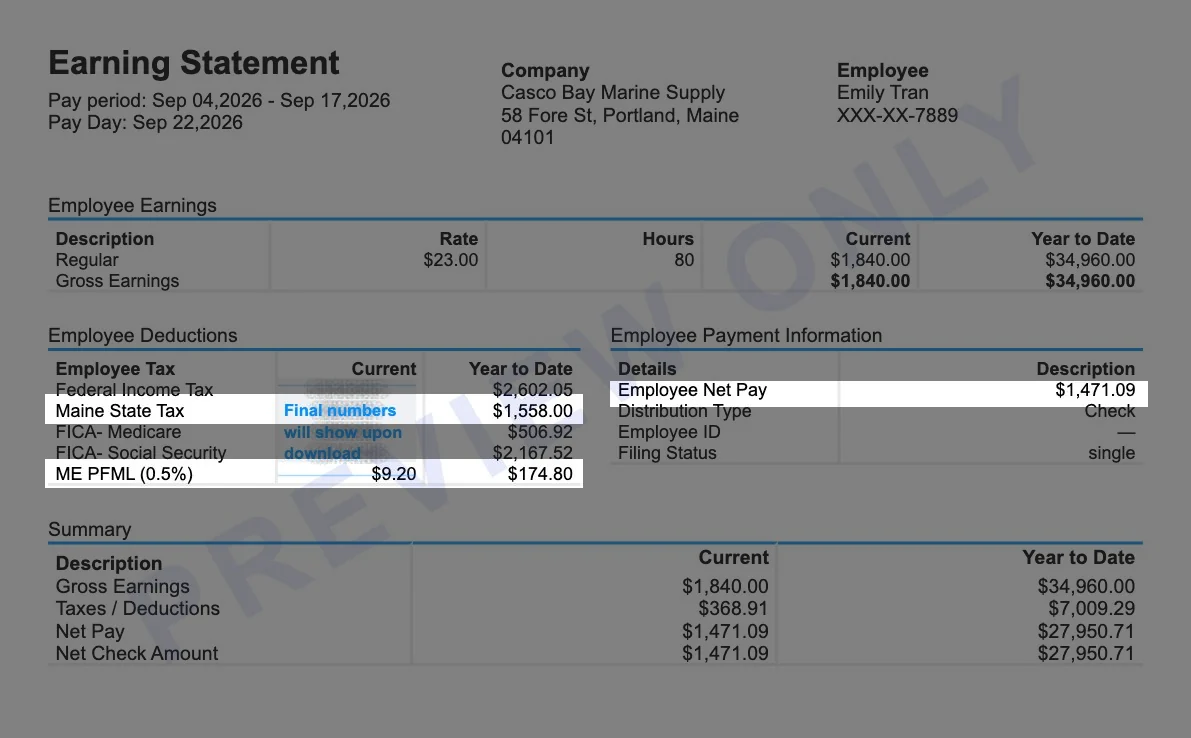
Scenario: hourly employee of a marine supply store at 58 Fore St, Portland, ME 04101, paid biweekly. Pay period Sep 4 to Sep 17, 2026, pay date Sep 22, 2026. $23.00 an hour for 80 hours. The employer has 15 or more employees and passes on half of the PFML premium. This is the 19th paycheck of the year.
| Line | Current | Year to date |
|---|---|---|
| Regular pay (80 hours at $23.00) | $1,840.00 | $34,960.00 |
| Federal income tax | $136.95 | $2,602.05 |
| Maine state income tax | $82.00 | $1,558.00 |
| Social Security (6.2%) | $114.08 | $2,167.52 |
| Medicare (1.45%) | $26.68 | $506.92 |
| ME PFML (0.5%) | $9.20 | $174.80 |
| Net pay | $1,471.09 | $27,950.71 |
This preview was generated with the withholding tables Maine published before its August 2026 revision. The revised tables lower Maine withholding by about a dollar per check at this pay level, so final stubs can show a slightly smaller state line. The year-to-date column is simply 19 identical checks added together.
Maine Minimum Wage 2026: $15.10 and the $7.55 Service Wage
| Wage rule | 2026 amount |
|---|---|
| Minimum wage | $15.10 per hour |
| Service employee direct wage | $7.55 per hour, if tips bring total pay to at least $15.10 |
| Tipped employee threshold | More than $191 a month in tips |
| Salary for overtime exemption | At least $871.16 per week ($45,300.32 a year) |
For tipped workers, the stub should show the direct wage and reported tips separately so it is clear that total hourly pay met the minimum.
Paydays and Final Paychecks in Maine
- Pay frequency: wages must be paid at regular intervals of no more than 16 days, covering work up to within 8 days of the payday (26 M.R.S. §621-A).
- Final pay: an employee who leaves must be paid in full by the next established payday (26 M.R.S. §626).
- Vacation payout: unused vacation earned since January 1, 2023 must be paid out at separation by employers with more than 10 employees.
Nearby State Pay Stub Resources
Create a pay stub for a nearby state or one of our most popular states.


Maine Paystub Generator FAQ
Does Maine require pay stubs?
Yes. Under 26 M.R.S. §665, employers must give a statement with each payment showing the pay period dates, hours, total earnings and itemized deductions. Electronic stubs are allowed if employees can access and print them for free.
What is the ME PFML deduction on my pay stub?
It is your share of the Maine Paid Family and Medical Leave premium. At employers with 15 or more employees the premium is 1% of wages and up to 0.5% can be deducted from you. It funds up to 12 weeks of paid leave, with benefits available since May 1, 2026.
What are the Maine income tax rates for 2026?
Maine uses three brackets: 5.8%, 6.75% and 7.15%. For single filers the 7.15% rate starts at $64,850 of taxable income. A 2% surcharge applies to income above $1,000,000 for single filers.
What is the Maine minimum wage in 2026?
$15.10 per hour. Service employees who receive more than $191 a month in tips can be paid a $7.55 direct wage if tips make up the difference.
How often must Maine employees be paid?
At regular intervals of no more than 16 days. Most Maine employers pay weekly or biweekly.
When is a final paycheck due in Maine?
By the next established payday after the employee leaves, including unused vacation earned since 2023 at employers with more than 10 employees.