
Leaving a job does not change your employer's obligation to send your W-2. Every employer that paid you wages during the year must furnish a Form W-2, even if you quit in March, were laid off or the company has since closed. What changes is how easy it is to reach them.
This guide walks through the order that works best: the payroll portal, then payroll or HR, then the IRS and, if the deadline is close, Form 4852 based on your final pay stub.
When to Expect a W-2 From a Former Employer
Former employees get their W-2 on the same schedule as current staff: by January 31 or the next business day when January 31 falls on a weekend. For 2026 wages, the deadline is February 1, 2027. The form goes to the last address the employer has on file or to the payroll portal if you agreed to electronic delivery.
That is why the most common reason a former employee is missing a W-2 is simply an old address. If you moved after leaving, update it with payroll as early as possible, ideally before the end of the year.
Step 1: Check the Payroll Portal
Many employers use ADP, Paychex, Paylocity, Workday, Gusto or a similar service and former employees often keep access to tax documents after they leave. Sign in with your old credentials or use the forgot password option, open the tax documents or year-end forms section and download the W-2 as a PDF. If your login was disabled, the payroll provider's support line can sometimes restore access to tax forms only.
Step 2: Contact Payroll or HR
Payroll issues the form, so start there and put the request in writing. Include:
- Your full legal name as it appeared on your paychecks
- The last four digits of your Social Security number (never the full number by email)
- Your dates of employment and your employee ID if you know it
- Your current mailing address and email
- The tax year you need and whether you want a mailed or electronic copy
Ask whether the form was already sent and to which address. If it was mailed to an old address and returned, they can reissue it. Some employers charge a small fee for extra copies after the first one.
If the Employer Closed or Does Not Respond
A closed business still has to file W-2s and its payroll provider often has the data. Try these in order:
- The payroll provider's employee portal or support line
- The owner, accountant or bankruptcy trustee named in closing notices
- An IRS wage and income transcript, free online, which shows the wage and withholding figures the employer reported. It is often the quickest way to get a copy of your W-2 online when the employer is gone.
Step 3: Call the IRS After the End of February
If you contacted the employer and still have no W-2 by the end of February, the IRS can step in. According to the IRS, you can call 800-829-1040 and the agency will contact the employer on your behalf and send you Form 4852 with instructions. Have this ready:
- Your name, address, Social Security number and phone number
- The employer's name, full address and phone number
- The employer identification number (EIN), if you have it
- Your dates of employment
- An estimate of your wages and federal income tax withheld
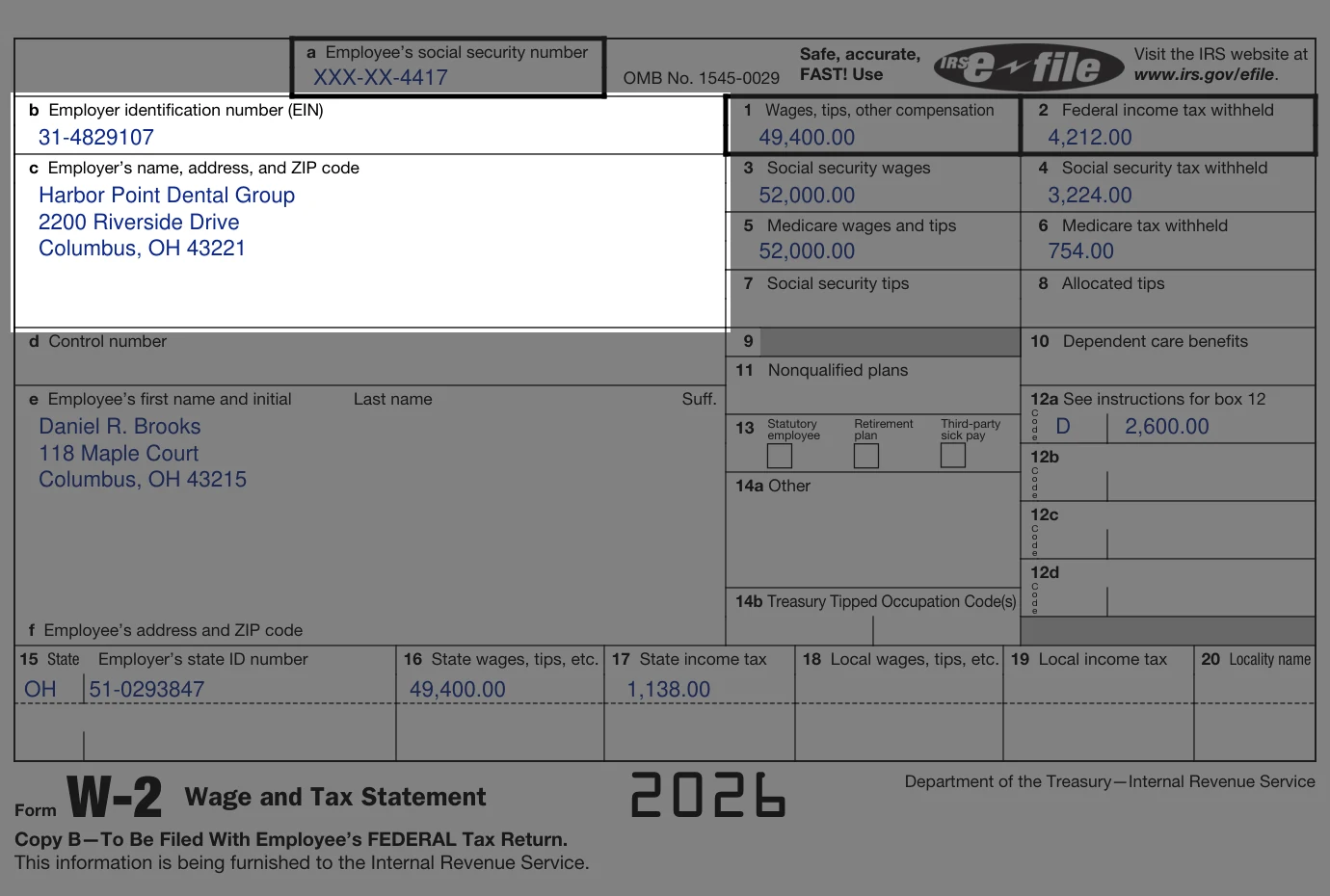
If you do not have an older W-2, the EIN may appear on a pay stub, an offer letter or a state unemployment notice.
Step 4: File With Form 4852 if the Deadline Is Close
Form 4852, Substitute for Form W-2, lets you file on time with your own figures. Take the year-to-date totals from your final pay stub for gross wages, pre-tax deductions, federal withholding, Social Security and Medicare. Explain on the form how you arrived at the numbers and what you did to get the W-2.
Your refund may take longer while the IRS verifies the figures. If the real W-2 arrives later with different numbers, file an amended return on Form 1040-X.
Getting a W-2 From an Earlier Year
- Former employer: payroll records are kept for years, so HR can often reissue an old form.
- IRS wage and income transcript: free for up to 10 years through your IRS Online Account or Form 4506-T.
- Form 4506: a copy of your full filed return, including any W-2s attached to a paper return, for $30 per return.
- Your tax software or preparer: past returns often include the W-2 data you entered.
If the W-2 From Your Old Job Is Wrong
Compare Box 1, Box 2 and your Social Security number with your final pay stub. If something is off, ask the former employer for a corrected Form W-2c before you file. Knowing why corrected W-2 forms matter helps if you already filed with the wrong numbers.
Keep every pay stub from each job so your W-2 figures are always easy to check.
Create a Pay Stub Now