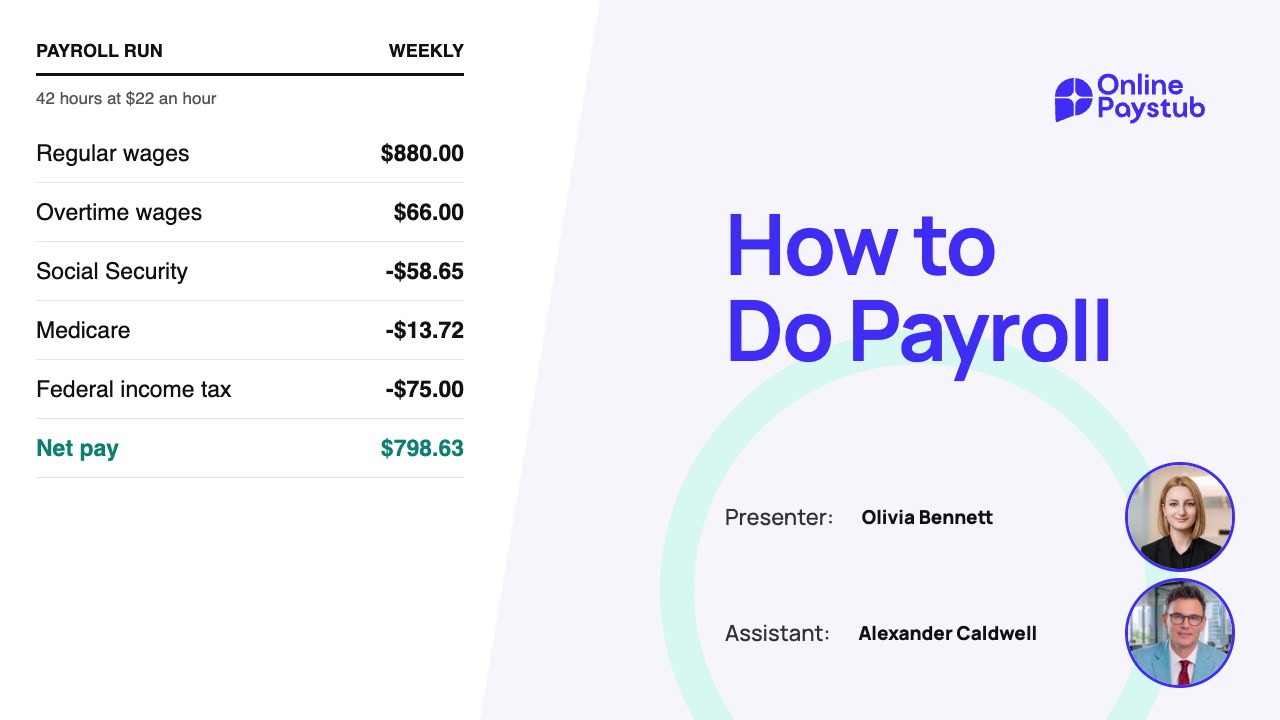

Learning how to do payroll is one of the first jobs you take on when you hire employees. You need to calculate wages, withhold the right taxes, pay people on time and keep accurate records. Missing even one of these steps can lead to payment errors, unhappy employees or tax penalties.
The good news is that you do not necessarily need an accountant or expensive software to get started. Small businesses with straightforward payroll can handle most of these tasks themselves, as long as they understand the requirements and stay organized.
This guide walks through payroll step by step, from setting up your business and collecting employee information to calculating paychecks, paying payroll taxes and keeping records.
What Is Payroll and How Does It Work?
Payroll is the process of calculating and paying employee wages while handling the taxes, deductions and records tied to those payments.
Every time you run payroll, you work out what each employee earned during the pay period, subtract the taxes and deductions that apply and pay the rest. You are also responsible for depositing payroll taxes, filing the required forms and documenting each payment.
A typical payroll run includes:
- Recording employee hours and earnings.
- Calculating gross pay, including overtime where it applies.
- Withholding federal, state and local taxes.
- Subtracting employee benefits and other deductions.
- Calculating net pay.
- Paying employees and providing any required wage statements.
- Depositing payroll taxes and filing the required returns.
- Keeping payroll records.
For example, an employee who works 40 hours at $20 an hour earns $800 of gross pay for the week. Before you pay them, you calculate tax withholding and any other deductions. What is left is their net pay.
The basic process is similar for most businesses, but the specific requirements depend on your state, how your workers are classified and your payroll schedule.
What Do You Need Before Running Payroll?
Before your first payroll you need to register for the right taxes, gather employee information and set a pay schedule. Getting these done early makes every later payroll run easier.
Get an Employer Identification Number (EIN)
An Employer Identification Number (EIN) is a nine-digit number issued by the Internal Revenue Service (IRS). Businesses use it to report employment taxes and identify themselves on federal tax forms.
If you do not have one yet, you can apply for an EIN with the IRS at no cost. Depending on where you operate, you may also need a state employer withholding number and a state unemployment insurance account.
Keep these registration details handy. You will need them every time you file a payroll tax return or make a tax deposit.
Collect Employee Information and Tax Forms
Each new employee has to give you the information needed to calculate wages and tax withholding:
- Form W-4: used to work out federal income tax withholding.
- Form I-9: used to verify identity and authorization to work in the United States.
- Social Security number: needed for wage reporting and payroll taxes.
- Personal information: legal name, address and start date.
- Compensation details: hourly rate or salary plus any overtime or bonus arrangements.
- Banking information: needed when employees choose direct deposit.
- State withholding forms: required in some states.
Employees usually complete Form W-4 when they start. You use it together with the IRS withholding tables to calculate federal income tax withholding.
Form I-9 has a different purpose. It verifies employment eligibility and must be completed within the federal deadlines. You keep it on file rather than sending it to the IRS.
Most states also require you to report each new hire to the state's new hire registry, generally within 20 days of the hire date and sooner in some states. The federal new hire reporting rules list each state's deadline and reporting options.
Classify each worker correctly as an employee or an independent contractor. For employees, decide whether they are exempt or nonexempt from overtime under the wage and hour laws that apply.
Choose a Payroll Schedule
Your payroll schedule decides how often employees are paid.
| Payroll schedule | Pay periods per year | Description |
|---|---|---|
| Weekly | 52 | Employees are paid every week. |
| Biweekly | 26 | Employees are paid every two weeks. |
| Semimonthly | 24 | Employees are paid twice a month. |
| Monthly | 12 | Employees are paid once a month. |
Biweekly and semimonthly payroll are often confused. Biweekly payroll runs every two weeks, while semimonthly payroll usually falls on two set dates each month.
Before you pick a schedule, check your state's payday rules. Some states require certain employees to be paid more often than others.
Once you have a compliant schedule, build a payroll calendar with pay period dates, paydays, tax deposit deadlines and filing dates.
How to Do Payroll Step by Step
With your business set up and the paperwork collected, you are ready to process payroll. These seven steps show how to run payroll manually for a small business.
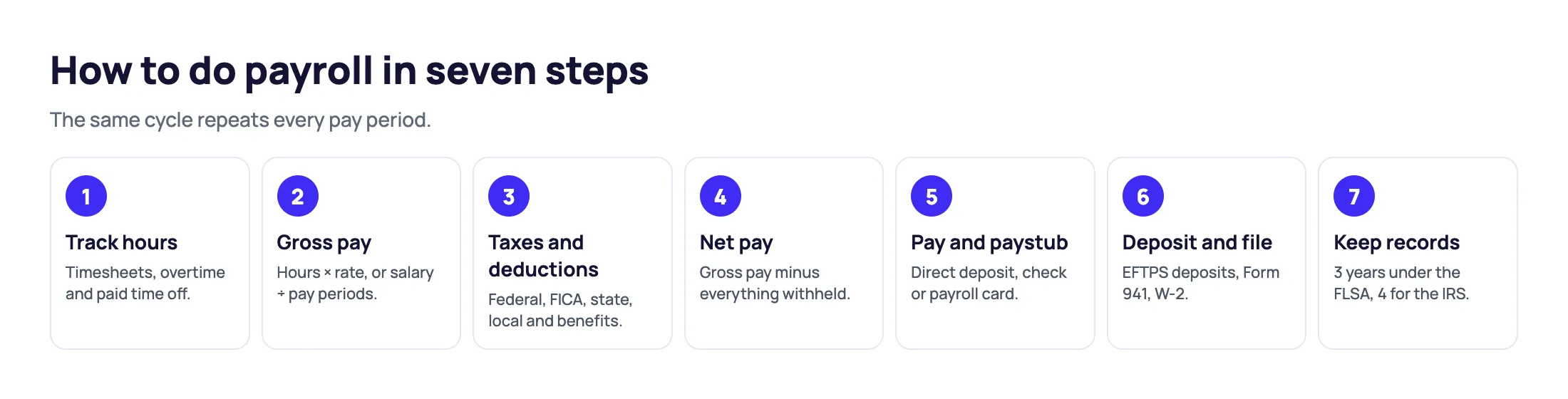
Step 1: Track Employee Hours and Attendance
Start by recording how many hours each employee worked during the pay period.
For hourly employees you need accurate records of regular hours, overtime and any other paid time. Salaried employees have more predictable earnings, but their hours can still matter for wage and overtime compliance.
Timesheets, spreadsheets, time clocks and attendance software all work. Before you calculate wages, check each record for missing shifts, wrong entries or unapproved changes.
Under the federal Fair Labor Standards Act (FLSA), covered nonexempt employees must generally receive at least 1.5 times their regular rate for hours worked beyond 40 in a workweek, as the Department of Labor overtime rules explain. Some states add their own overtime requirements.
Step 2: Calculate Gross Pay
Gross pay is the total an employee earns before taxes and other deductions. How you calculate it depends on whether the employee is paid by the hour or on salary.
For hourly employees
Multiply the regular hours worked by the hourly rate.
Gross Pay = Hours Worked × Hourly Rate
An employee working 40 hours at $20 an hour earns 40 × $20 = $800 of gross pay. If the employee works overtime, calculate the overtime earnings separately and add them to the regular wages.
For salaried employees
Divide the annual salary by the number of pay periods in the year.
Gross Pay = Annual Salary ÷ Number of Pay Periods
An employee earning $52,000 a year on a biweekly schedule receives $52,000 ÷ 26 = $2,000 of gross pay per pay period before any adjustments.
Remember to include bonuses, commissions, taxable benefits and other compensation where they apply.
Step 3: Calculate Payroll Taxes and Deductions
Once you know gross pay, work out the taxes and deductions that apply to each employee. Payroll taxes usually include federal income tax withholding, Social Security tax, Medicare tax and any state or local taxes.
Federal income tax
Federal income tax withholding depends on the employee's wages, pay frequency, Form W-4 and the IRS withholding method you use. There is no single withholding percentage that fits every employee. Use the current IRS Publication 15-T tables or a payroll calculator built on them.
Social Security tax
The employee Social Security rate is 6.2% of wages up to the annual wage base, which is $184,500 for 2026. Employers pay a matching 6.2%.
Medicare tax
Employees pay 1.45% Medicare tax and employers pay a matching 1.45%. Unlike Social Security, the standard Medicare tax has no annual wage cap.
Employers must also withhold the 0.9% Additional Medicare Tax on an employee's wages above $200,000 in a calendar year. There is no employer match for this extra tax.
State and local taxes
Depending on where the employee works and lives, you may also have to withhold state income tax, local income tax or other employment taxes.
Other payroll deductions
Employee deductions can include health insurance premiums, retirement contributions and court-ordered wage garnishments. Some come out before certain taxes and others after, depending on the benefit or deduction involved.
Step 4: Calculate Net Pay
Net pay is what the employee receives after taxes and deductions are subtracted from gross pay.
Net Pay = Gross Pay − Employee Taxes − Other Employee Deductions
Suppose an employee has $1,000 of gross pay and these deductions:
| Payroll item | Amount |
|---|---|
| Gross pay | $1,000.00 |
| Federal income tax withholding | $90.00 |
| Social Security tax | $62.00 |
| Medicare tax | $14.50 |
| Health insurance deduction | $40.00 |
| Net pay | $793.50 |
In this simplified example the employee takes home $793.50. The federal income tax figure is illustrative, not an actual withholding calculation. Real amounts depend on the employee's situation, the tax rules that apply and how each deduction is treated.
Employer payroll taxes are separate from employee deductions. Your business pays its own share of Social Security and Medicare on top of the employee's gross wages.
Step 5: Pay Employees and Create Paystubs
After calculating net pay, pay employees on your regular schedule. The common methods are direct deposit, paper checks and payroll cards.
Direct deposit moves wages electronically into employee bank accounts. Paper checks are still an option but take more handling. Some employers also use payroll cards, which let employees reach their wages through a prepaid card account.
Once the payment is ready, record the employee's earnings and deductions on a paystub. A typical paystub shows the employee's name, employer details, pay period, gross wages, taxes withheld, other deductions and net pay. Many also show year-to-date totals for earnings and withholding.
After you have calculated and checked the payroll amounts, you can make a paystub in minutes with Online Paystub.
Paystub requirements vary by state. Some states require detailed wage statements, while others set different rules on format and delivery; each state paystub generator page covers that state's rules. A paystub does not replace the employer's duty to calculate wages correctly, pay on time and meet its tax obligations.
Step 6: Deposit Payroll Taxes and File Tax Forms
Paying employees is only part of payroll. You also have to deposit payroll taxes and file the employment tax returns that apply to you.
Form 941
Most employers file Form 941, the Employer's Quarterly Federal Tax Return, to report federal income tax withheld plus Social Security and Medicare taxes. Some small employers file Form 944 once a year instead when the IRS tells them to.
Federal tax deposits
Federal employment tax deposits are made electronically, for example through the Electronic Federal Tax Payment System (EFTPS). Your deposit schedule is monthly or semiweekly depending on the IRS lookback period. Large liabilities can also trigger a next-day deposit rule.
Your deposit schedule is not necessarily the same as your payroll schedule or your quarterly filing deadline.
Federal unemployment tax
Employers may also owe FUTA tax under the Federal Unemployment Tax Act. It is paid by the employer and is never deducted from employee wages.
Annual wage reporting
Employers must prepare a Form W-2 for each employee and send the wage information to the Social Security Administration.
State unemployment insurance, state withholding, local taxes and new hire reporting can add their own obligations. Because deadlines differ, keep a separate calendar entry for every payment and return.
Step 7: Keep Accurate Payroll Records
The last step is documenting and securely storing your payroll information. Good records help you verify payments, prepare tax returns, answer employee questions and support compliance during an audit.
Important records include:
- Employee names, identifying information and compensation details.
- Hours worked and any overtime.
- Gross wages, net wages and payroll deductions.
- Pay periods and payment dates.
- Payroll tax deposits and filed returns.
- Employee W-4 forms and other required documents.
- Paystub copies and payment records.
Different laws set different retention periods. Under the FLSA recordkeeping rules, employers must keep payroll records for at least three years and supporting records such as timecards and wage rate tables for at least two years.
The IRS asks employers to keep employment tax records for at least four years after the tax is due or paid, whichever is later. Some states require longer, so check the rules for your business.
Example of How to Calculate Payroll Manually
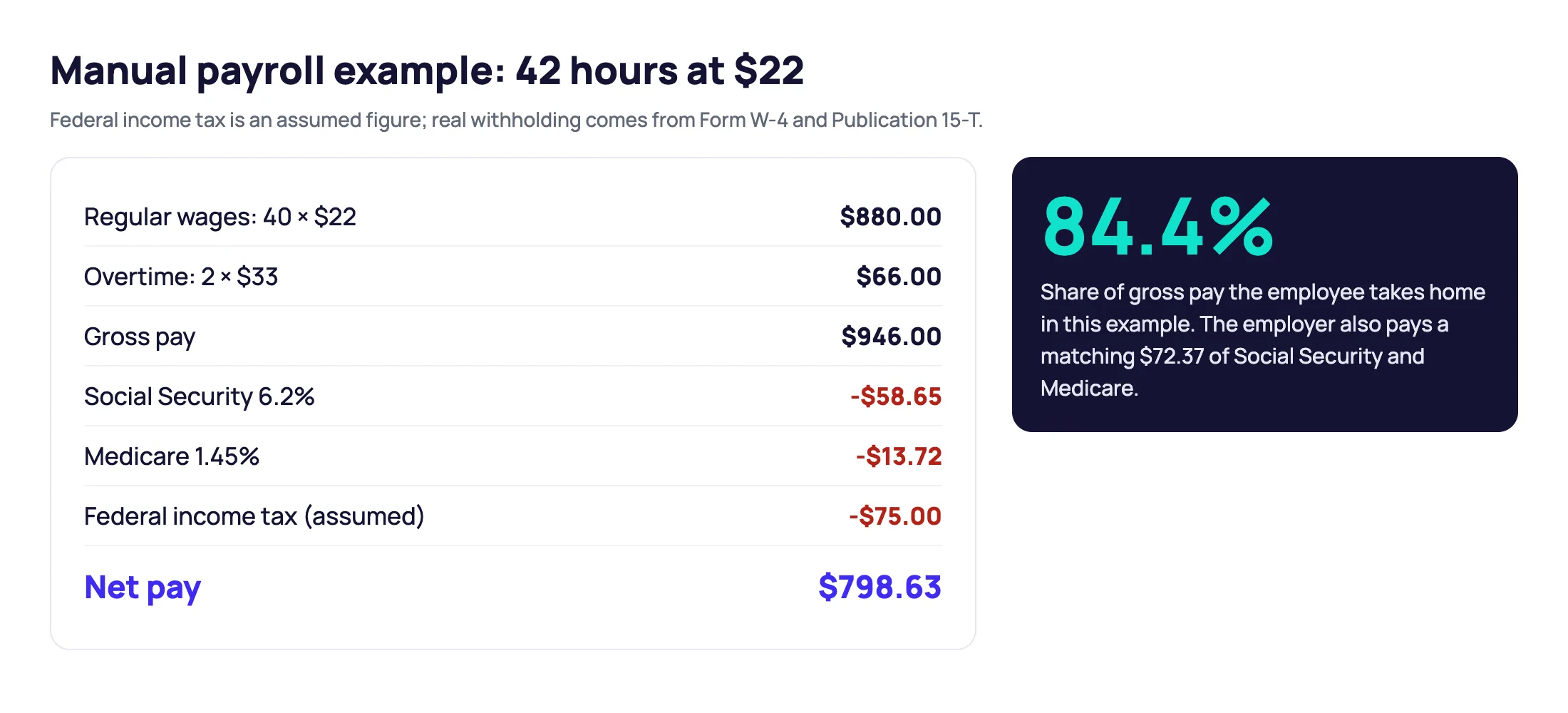
Here is a complete payroll calculation for one employee. You own a small retail store and pay an employee $22 an hour. During one workweek the employee works 42 hours and is eligible for overtime under federal law. Assume no special overtime adjustments and no state overtime rules beyond the federal standard.
- Regular wages: 40 hours × $22 = $880.
- Overtime rate: $22 × 1.5 = $33 an hour.
- Overtime wages: 2 hours × $33 = $66.
- Gross pay: $880 + $66 = $946.
- Social Security: $946 × 6.2% = $58.65, assuming the employee is below the annual wage base.
- Medicare: $946 × 1.45% = $13.72.
- Other withholding: assume $75 of federal income tax and no other deductions or state and local taxes.
- Net pay: $946 − $58.65 − $13.72 − $75 = $798.63.
| Payroll detail | Amount |
|---|---|
| Regular wages | $880.00 |
| Overtime wages | $66.00 |
| Gross pay | $946.00 |
| Social Security tax | $58.65 |
| Medicare tax | $13.72 |
| Assumed federal income tax | $75.00 |
| Net pay | $798.63 |
The employee's illustrative take-home pay is $798.63. Your business would also owe its matching Social Security and Medicare and any unemployment taxes that apply.
In a real payroll run, federal income tax withholding comes from the employee's Form W-4 and the IRS withholding method, not from an assumed $75.
Common Payroll Mistakes to Avoid
Payroll errors get expensive, especially when they involve wrong wages, missed tax deposits or incomplete records. Watch for these.
Misclassifying Employees
Treating an employee as an independent contractor can lead to unpaid wages, tax bills and penalties. Wrongly classifying an employee as exempt from overtime carries the same risk. Review the classification rules before you pay anyone, especially contractors and salaried staff.
Calculating Overtime Incorrectly
Not every salaried employee is exempt from overtime. For nonexempt employees, overtime has to follow federal and state rules. Some bonuses also change the regular rate used to calculate it.
Missing Payroll Tax Deadlines
Late deposits and filings bring IRS penalties and interest. Keep a payroll tax calendar and track deposit dates separately from paydays.
Using Outdated Tax Information
Tax rules, withholding tables, wage bases and state requirements change. Use current IRS guidance and your state's resources instead of last year's numbers.
Keeping Incomplete Payroll Records
Missing timesheets, wrong employee details or inconsistent wage records make tax reporting and audits harder. Review payroll reports after every pay period and store employee information securely.
Manual Payroll vs. Payroll Software
Small businesses have three ways to handle payroll: do it manually, use payroll software or outsource it to a payroll professional. Each has strengths and limits.
| Method | Main advantage | Main disadvantage |
|---|---|---|
| Manual payroll | More control and possibly lower software costs | Time-consuming and more prone to calculation errors |
| Payroll software | Automates many calculations and recurring tasks | Usually needs a subscription or processing fees |
| Outsourced payroll | Professional help with payroll administration | Often costs more and gives you less direct control |
Manual payroll can work for businesses with a few employees, steady hours and simple pay. You calculate wages, manage taxes and track compliance yourself.
Payroll software cuts repetitive work by automating wage calculations, withholding and recordkeeping and, with some providers, tax filings.
Outsourced payroll suits businesses with complicated payroll, employees in several states or little administrative capacity.
Businesses that outgrow spreadsheets can compare cheap payroll services built for small teams. The right choice depends on your headcount, budget, payroll complexity and how much time you can give it.
Final Thoughts
Doing payroll yourself keeps you in control of employee payments and can cut some administrative costs. The key is a reliable process in place before your first payday.
Register your business, collect employee information and choose a compliant pay schedule. Then track hours, calculate gross and net pay, withhold taxes, pay employees and keep accurate records.
As the business grows, check whether manual payroll still makes sense. More employees, changing tax rules and more complex pay can make software or professional help worth the cost. Whatever you choose, accurate calculations, on-time payments and organized records stay the foundation of your payroll.
This article is general information about payroll, not tax or legal advice. Tax rates, wage bases and state rules change; check the IRS, your state agencies or a payroll professional for your situation.
Turn your verified payroll figures into a clear, itemized pay stub.
Create a Pay Stub Now